- Diese Funktion befindet sich derzeit in der Beta-Phase. Sie können mit Aktualisierungen und Änderungen der Zugänglichkeit oder Preisgestaltung rechnen, während wir sie verfeinern und verbessern. Wir wissen Ihre Geduld zu schätzen und freuen uns über jedes Feedback. Vielen Dank, dass Sie ein früher Anwender sind!
- Diese Funktion ist nur im Enterprise Plus Plan verfügbar.
- Dies kann nur von einem Admin durchgeführt werden.
Benutzerdefinierte Berechtigungen ermöglichen Admins, präzise zu steuern, welche Aktionen jede Benutzerrolle in Manatal ausführen kann. Dies hilft Teams, operative Verantwortlichkeiten zu delegieren, ohne vollen Zugriff zu gewähren, Engpässe zu reduzieren und reale Teamstrukturen besser widerzuspiegeln – insbesondere für wachsende, mittelständische und große Unternehmen. Die Funktion wurde entwickelt, um Admins Flexibilität zu bieten und gleichzeitig Sicherheit und Governance zu gewährleisten.
Was sind benutzerdefinierte Berechtigungen?
Benutzerdefinierte Berechtigungen ermöglichen Administratoren:
- Definieren, welche Aktionen jede Benutzerrolle ausführen darf
- Berechtigungen pro Objekt (z.B. Jobs, Organisationen) feinabstimmen
- Nicht-Admin-Rollen befähigen, tägliche Operationen selbstständig zu handhaben
Anstatt sich ausschließlich auf starre, vordefinierte Rollen zu verlassen, können Admins Berechtigungen an die tatsächliche Arbeitsweise ihrer Teams anpassen, ohne sensible System- oder Abrechnungseinstellungen preiszugeben.
Welche Rollen werden unterstützt?
Benutzerdefinierte Berechtigungen können für alle bestehenden Systemrollen konfiguriert werden, einschließlich:
- Admin
- Manager
- Recruiter
- Consultant
Das Erstellen völlig neuer Rollen wird in der aktuellen Version nicht unterstützt. Admins können Berechtigungen innerhalb der bestehenden Rollen anpassen.
Welche Objekte werden unterstützt?
In der aktuellen Version sind benutzerdefinierte Berechtigungen für die folgenden Objekte verfügbar:
- Organisationen
- Jobs
Die Unterstützung für zusätzliche Objekte wird inkrementell basierend auf Kundenfeedback hinzugefügt. Wenn Sie eine Berechtigung benötigen, die für Ihr tägliches Geschäft erforderlich ist, teilen Sie uns bitte Ihr Feedback über support@manatal.com mit.
Welche Berechtigungen können angepasst werden?
Für jedes unterstützte Objekt können Admins Berechtigungen konfigurieren, wie zum Beispiel:
Berechtigungen für Organisationen
- Organisationen erstellen
- Organisationen archivieren
- Organisationsbesitz übertragen
- Stellenanforderungen anzeigen und verwalten
Berechtigungen für Jobs
- Jobs erstellen
- Jobs archivieren
- Job-Besitz übertragen
- Jobs auf der Karriereseite und kostenlosen Jobbörsen veröffentlichen
Jede Berechtigung wird auf drei Ebenen bewertet, um eine detaillierte Kontrolle zu ermöglichen:
- Objektbesitzer: Ein Benutzer, der Eigentümer eines Jobs/einer Organisation ist.
- Objekt-Teammitglied: Ein Benutzer, der Teammitglied eines Jobs/einer Organisation ist.
- Objekt-Nicht-Teammitglied: Ein Benutzer, der weder Teammitglied noch Eigentümer eines Jobs/einer Organisation ist.
Erste Schritte mit benutzerdefinierten Berechtigungen
Schritt 1: Rollen- & Berechtigungseinstellungen öffnen
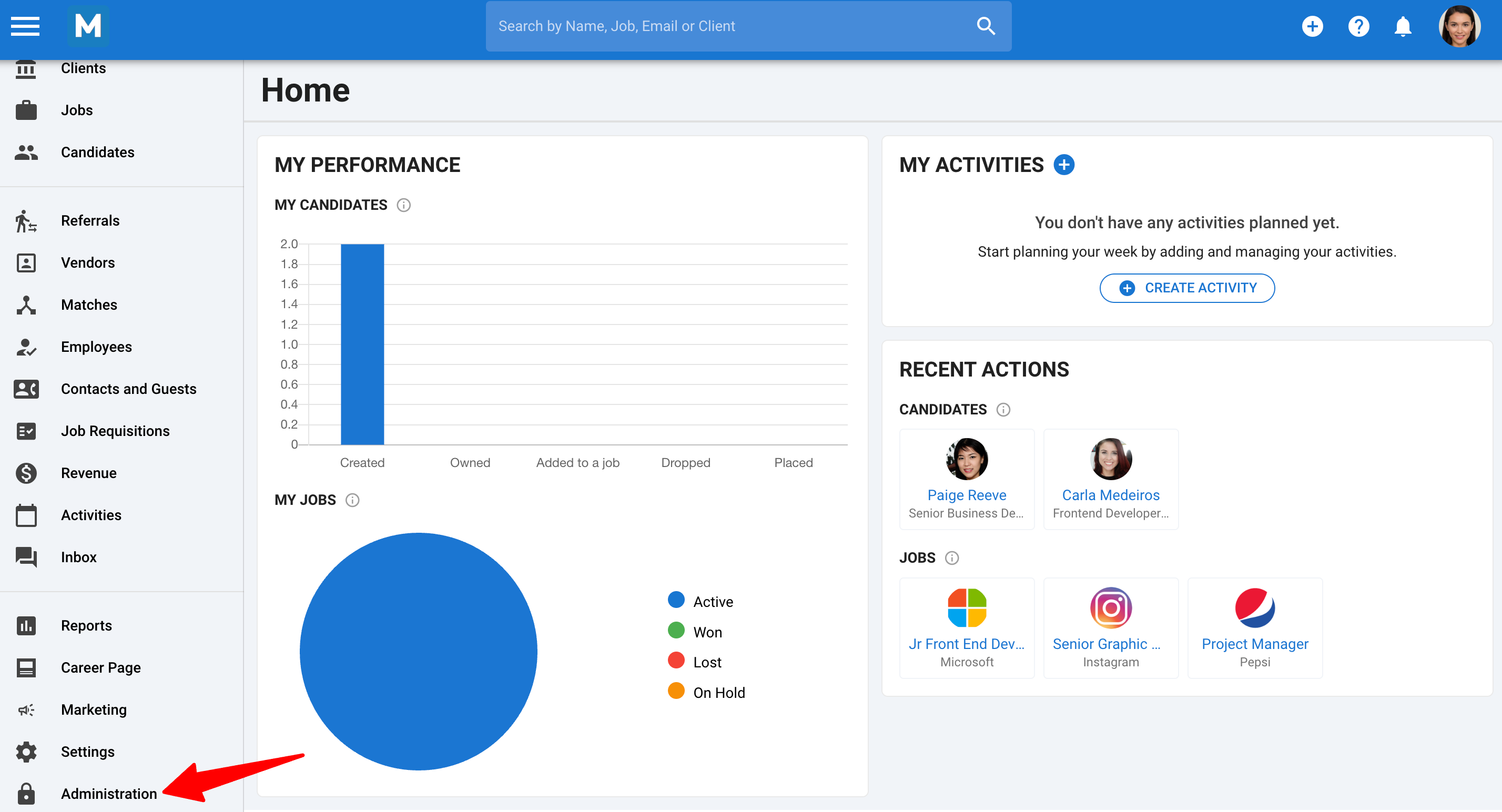
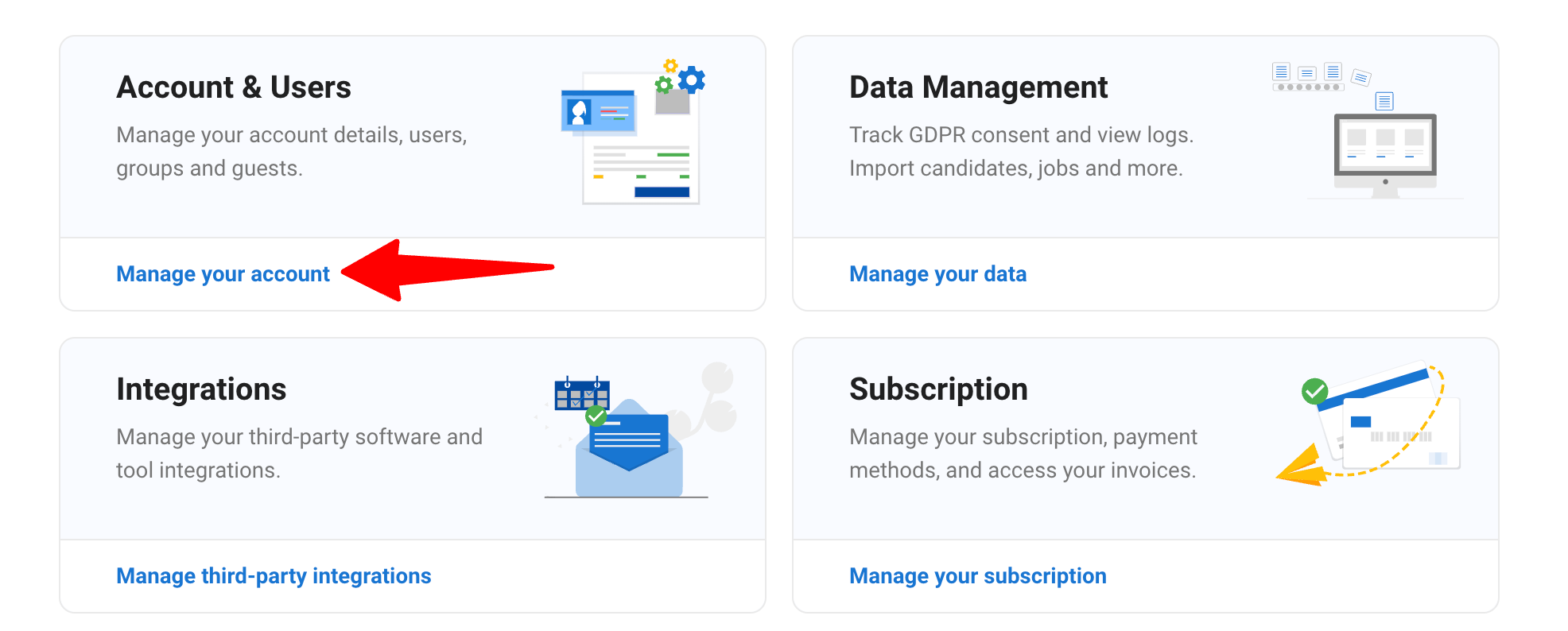
- Gehen Sie zu der folgenden Seite. Alternativ klicken Sie in Ihrem Seitenmenü auf ""Administration"", öffnen Sie die Kategorie ""Konto und Benutzer"".
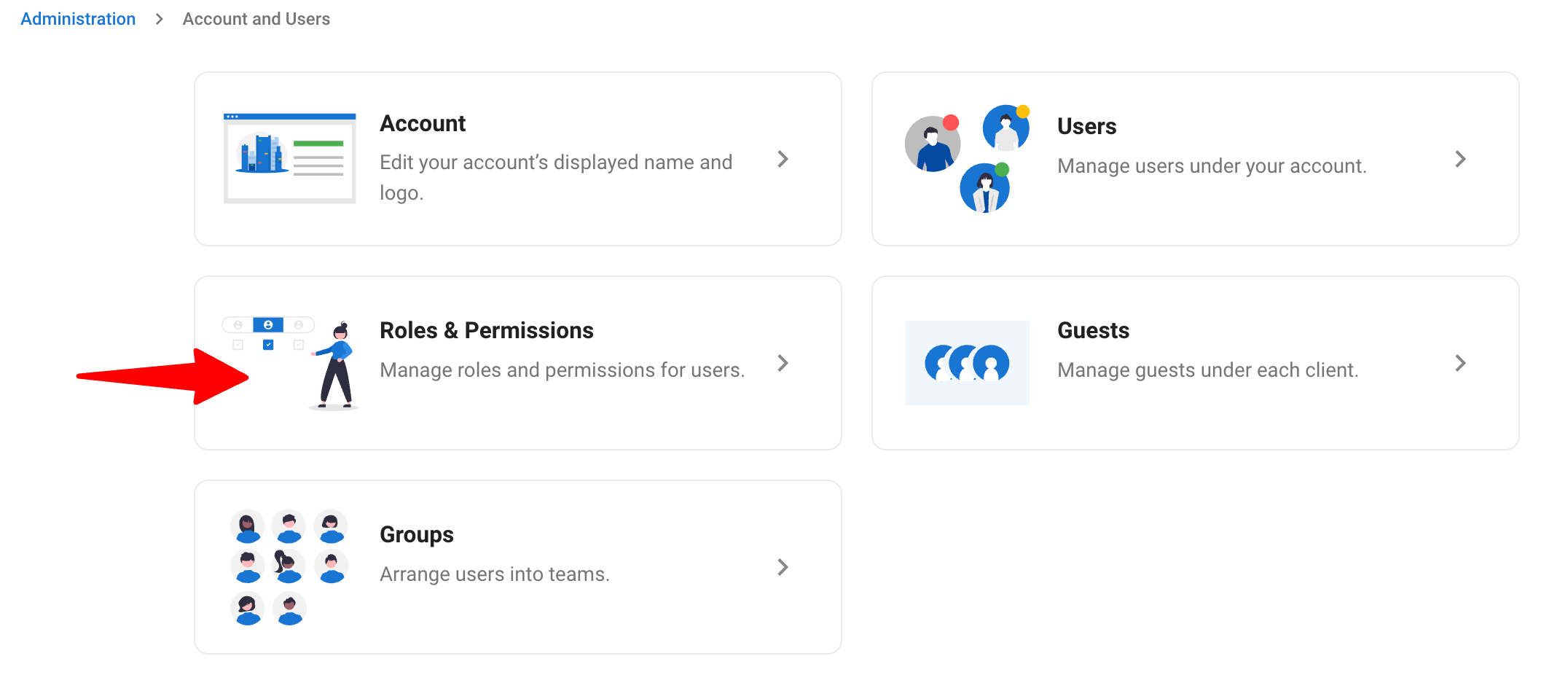
- Klicken Sie auf die Kategorie ""Rollen & Berechtigungen"".
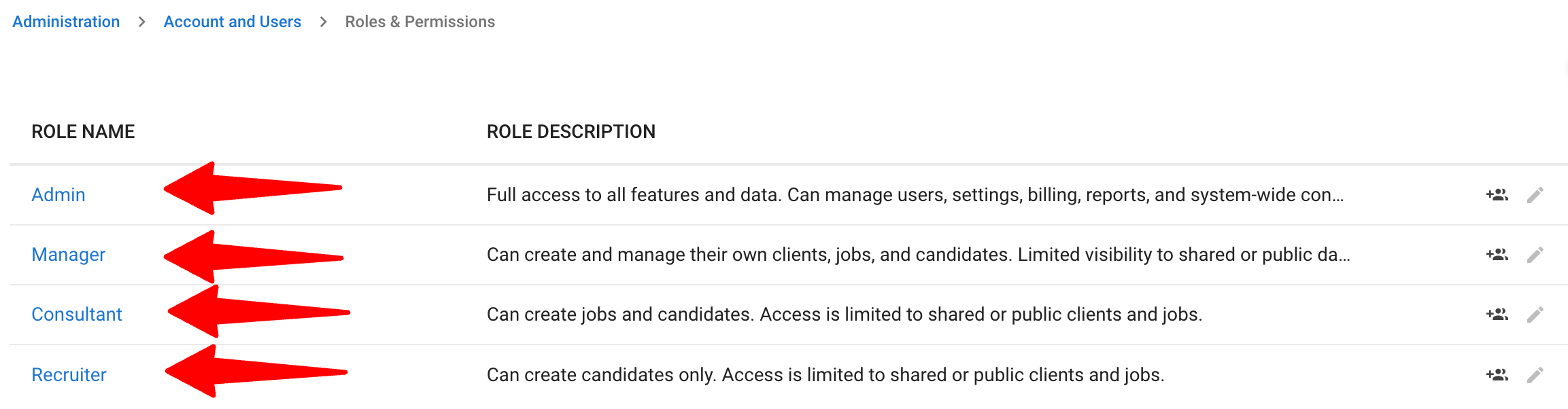
Schritt 2: Eine anzupassende Rolle auswählen
- Wählen Sie die Rolle, die Sie ändern möchten.
Schritt 3: Berechtigungen konfigurieren
Überprüfen Sie die Liste der verfügbaren Berechtigungen für die jeweilige Rolle.
- Aktionen pro Objekt nach Bedarf aktivieren oder deaktivieren.
- Ihre Änderungen speichern.
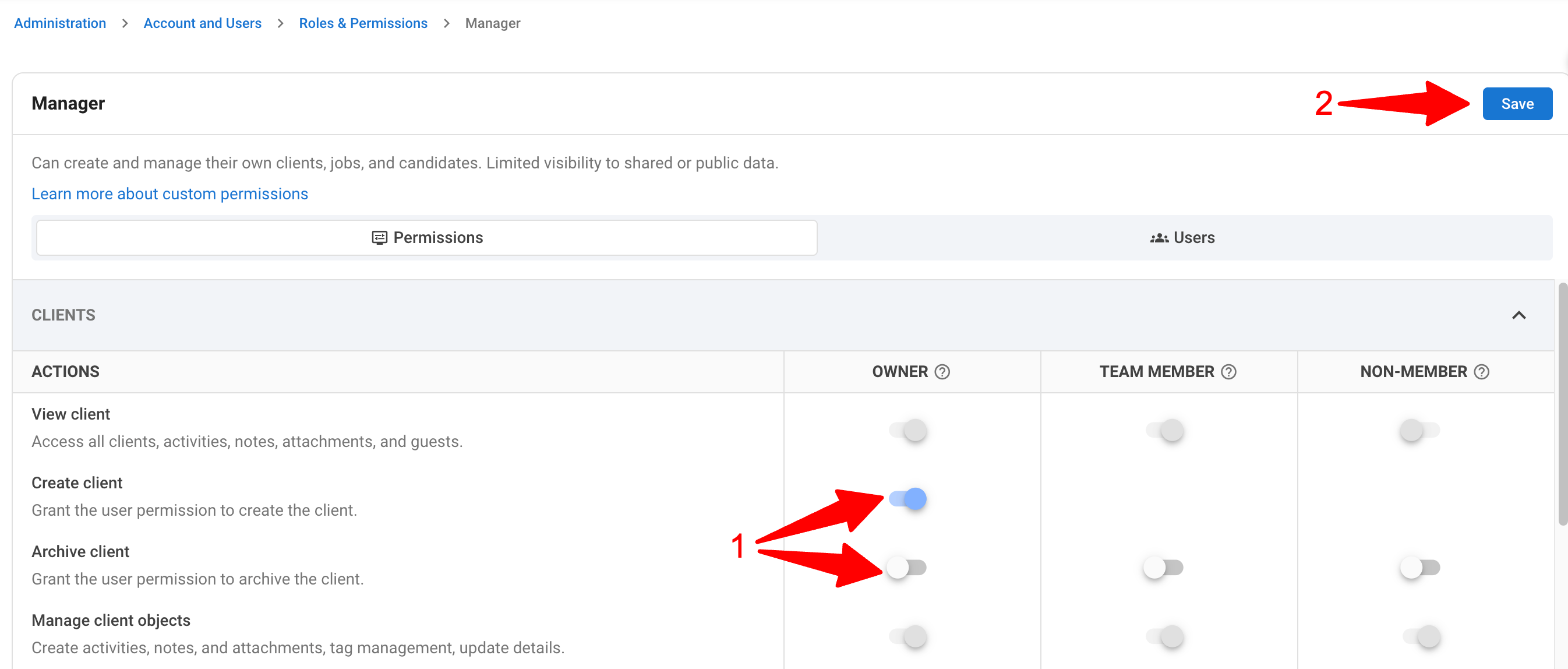
Nach dem Speichern gelten die aktualisierten Berechtigungen sofort für alle Benutzer, die dieser Rolle zugewiesen sind.
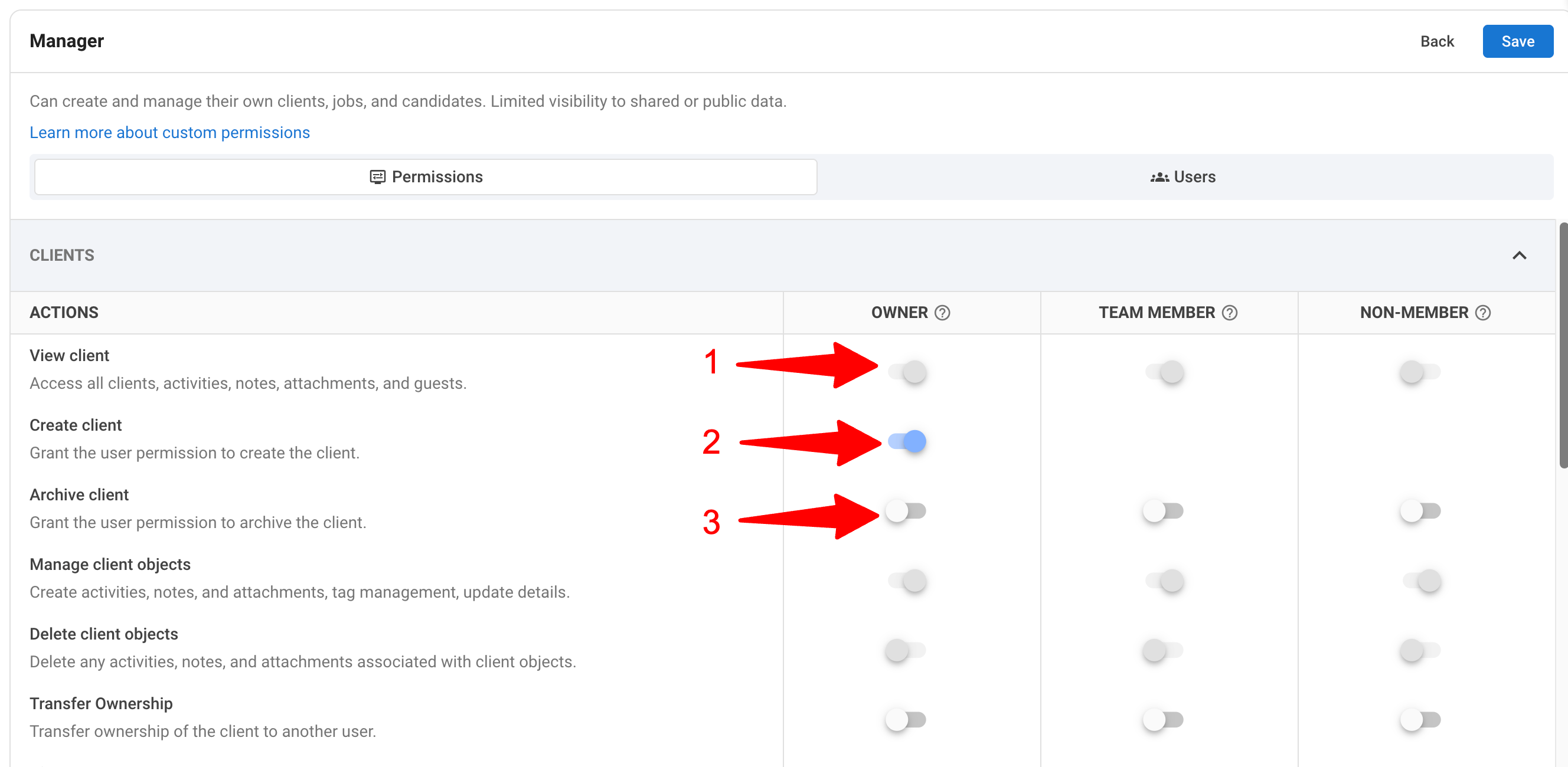
Die Anzeige zeigt 3 Ebenen der Berechtigungsaktivierung:
1. Hellgraue Schalter: Dies sind Berechtigungen, die als Standard festgelegt sind und nicht angepasst werden können.
2. Blau hervorgehobene Schalter: Zeigt an, dass die anpassbare Berechtigung aktiviert ist (was bedeutet, dass diese Rolle die Berechtigung hat, die Aktion auszuführen).
3. Dunkelgraue Schalter: Zeigt an, dass die anpassbare Berechtigung deaktiviert ist (was bedeutet, dass diese Rolle die Berechtigung nicht hat, die Aktion auszuführen).
Benutzer zur Rolle zuweisen
- Navigieren Sie zum Tab "Benutzer".
.png)
- Klicken Sie auf "Benutzer dieser Rolle zuweisen".
.png)
- Klicken Sie auf das + Symbol neben dem Benutzer, dem Sie diese Rolle zuweisen möchten.
Die Zuweisung dieser Rolle überschreibt automatisch die zuvor zugewiesene Rolle des Benutzers.
.png)
Verfügbare Aktionen
- Anzeigen: Öffnet ein neues Fenster mit allen verfügbaren Informationen zu diesem spezifischen Benutzer.
- Bearbeiten: Ermöglicht Ihnen, die Details des Benutzers zu ändern.
- Sperren: Schränkt den Zugriff des Benutzers vorübergehend ein.
- Rolle ändern: Öffnet ein Pop-up-Fenster zur Auswahl und Anwendung einer anderen Rolle.
- Löschen: Entfernt den Benutzer dauerhaft aus dem System.
.png)
Anwendungsfälle
1. Managern den Betrieb ohne Admin-Abhängigkeit ermöglichen
Admins können Managern erlauben, die folgenden Aktionen auszuführen, ohne Zugriff auf sensible, nur für Admins zugängliche Bereiche zu gewähren:
- Besitz übertragen
- Jobs oder Organisationen archivieren
2. Unterstützung nicht-standardisierter Teamstrukturen
Admins können:
- Sourcing- oder Vertriebsteams erlauben, Datensätze zu erstellen und zu verwalten
- Zugriff auf Exporte, Abrechnung oder systemweite Einstellungen einschränken
Dies stellt sicher, dass verschiedene Teams mit genau dem richtigen Zugriffslevel an Bord genommen werden.
Verfügbarkeit & Grenzen
- Diese Funktion ist im Enterprise Plus Plan verfügbar.
- Andere Pläne können die Berechtigungen einsehen, können die angepassten Berechtigungen jedoch nicht speichern, ohne auf den Enterprise Plus Plan zu upgraden.
- Es gibt keine Begrenzung, wie viele Berechtigungen pro Rolle angepasst werden können.
FAQ
F1. Kann ich neue benutzerdefinierte Rollen erstellen?
Nein. Die aktuelle Version erlaubt nur die Anpassung bestehender Rollen.
F2. Gibt es eine Begrenzung, wie stark ich Berechtigungen anpassen kann?
Nein. Admins können alle verfügbaren Berechtigungen für jede Rolle ohne Einschränkung anpassen.
F3. Sind Berechtigungen zukünftig erweiterbar?
Ja. Das Berechtigungssystem ist erweiterbar konzipiert. Neue Berechtigungen und unterstützte Objekte werden basierend auf Kundenbedürfnissen hinzugefügt.
F4. Beeinträchtigen Berechtigungen die Sichtbarkeitseinstellungen meiner Organisation?
Nein. Benutzerdefinierte Berechtigungen sind eine Ebene von Aktionen, die Benutzer ausführen können. Die Sichtbarkeitseinstellungen werden durch die benutzerdefinierten Berechtigungen nicht beeinflusst. Zum Beispiel: Wenn ein Benutzer keinen Zugriff auf eine Organisation oder keine Sichtbarkeit hat, kann er die benutzerdefinierten Berechtigungen für die betreffende Organisation nicht nutzen.