Was ist die Never Log List?
Die Never Log List ermöglicht es Admins, die E-Mail-Sichtbarkeit in Manatal zu steuern. Fügen Sie eine E-Mail-Adresse oder eine gesamte Domain zur Liste hinzu, und Manatal wird aufhören, E-Mails im Tab Posteingang eines beliebigen Kandidaten-, Kontakt- oder Gast-Profils anzuzeigen, das diese Adresse oder Domain verwendet. Erfahren Sie mehr über den Posteingang in diesem Artikel.
Dies dient dem Schutz privater Konversationen. Zum Beispiel kann ein Hiring Manager sein E-Mail-Konto sicher verknüpfen, ohne interne Threads preiszugeben, falls jemand sein Profil hinzufügen sollte: Fügen Sie seine Adresse (oder Ihre gesamte Unternehmensdomain) zur Liste hinzu, und seine E-Mails erscheinen nicht mehr in seinem Kontakt- oder Gast-Profil innerhalb von Manatal.
Die Never Log List steuert die Sichtbarkeit, nicht die Synchronisierung. E-Mails werden im Hintergrund weiterhin normal verarbeitet und verknüpft, und sie bleiben in den Posteingängen sichtbar, in die sie gehören (siehe Wie es funktioniert unten). Ihr eigener Benutzer-Posteingang ist niemals betroffen.
Hinzufügen von E-Mails oder Domains zur Liste
Dies kann nur von einem Admin durchgeführt werden.
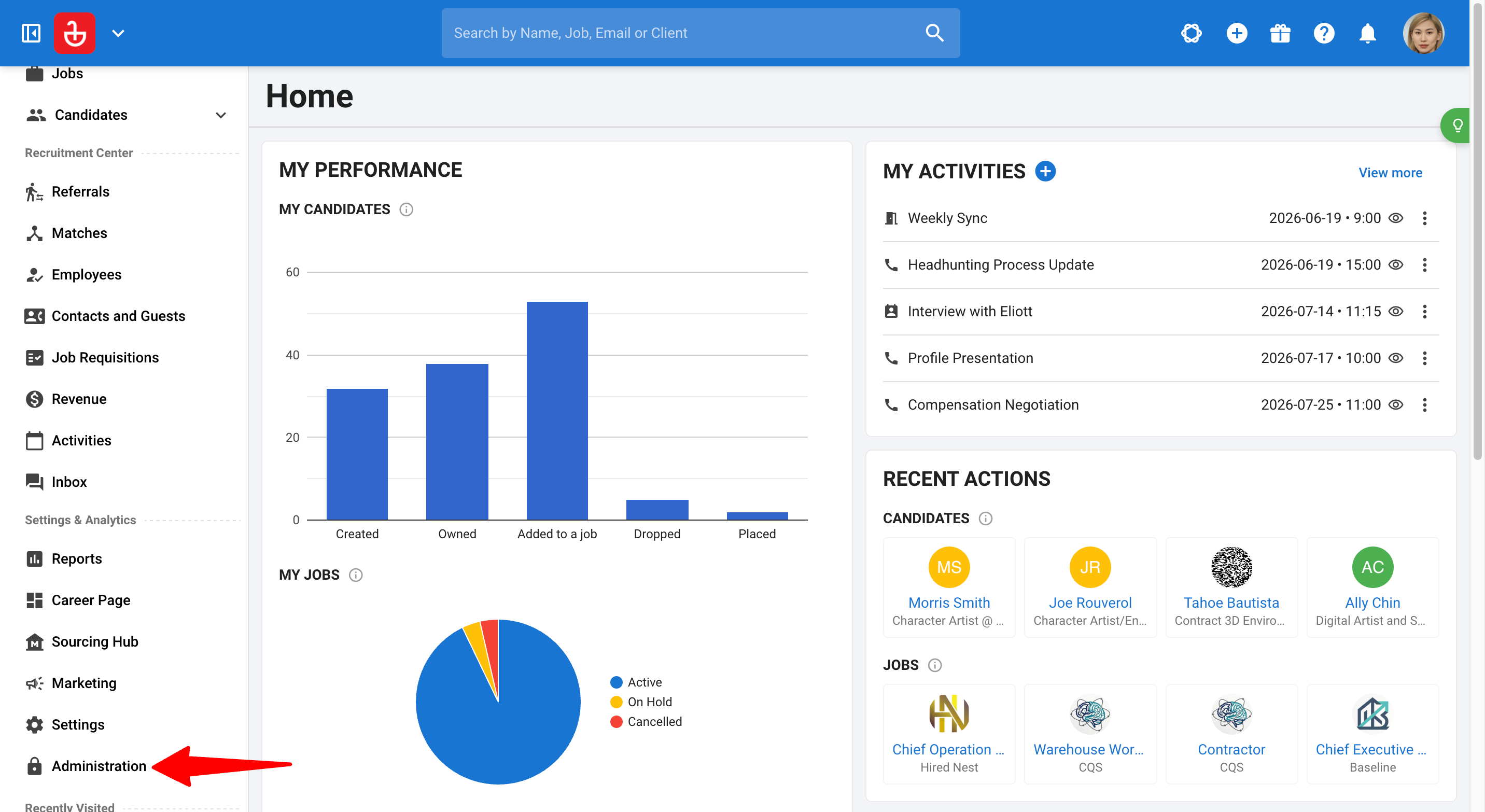
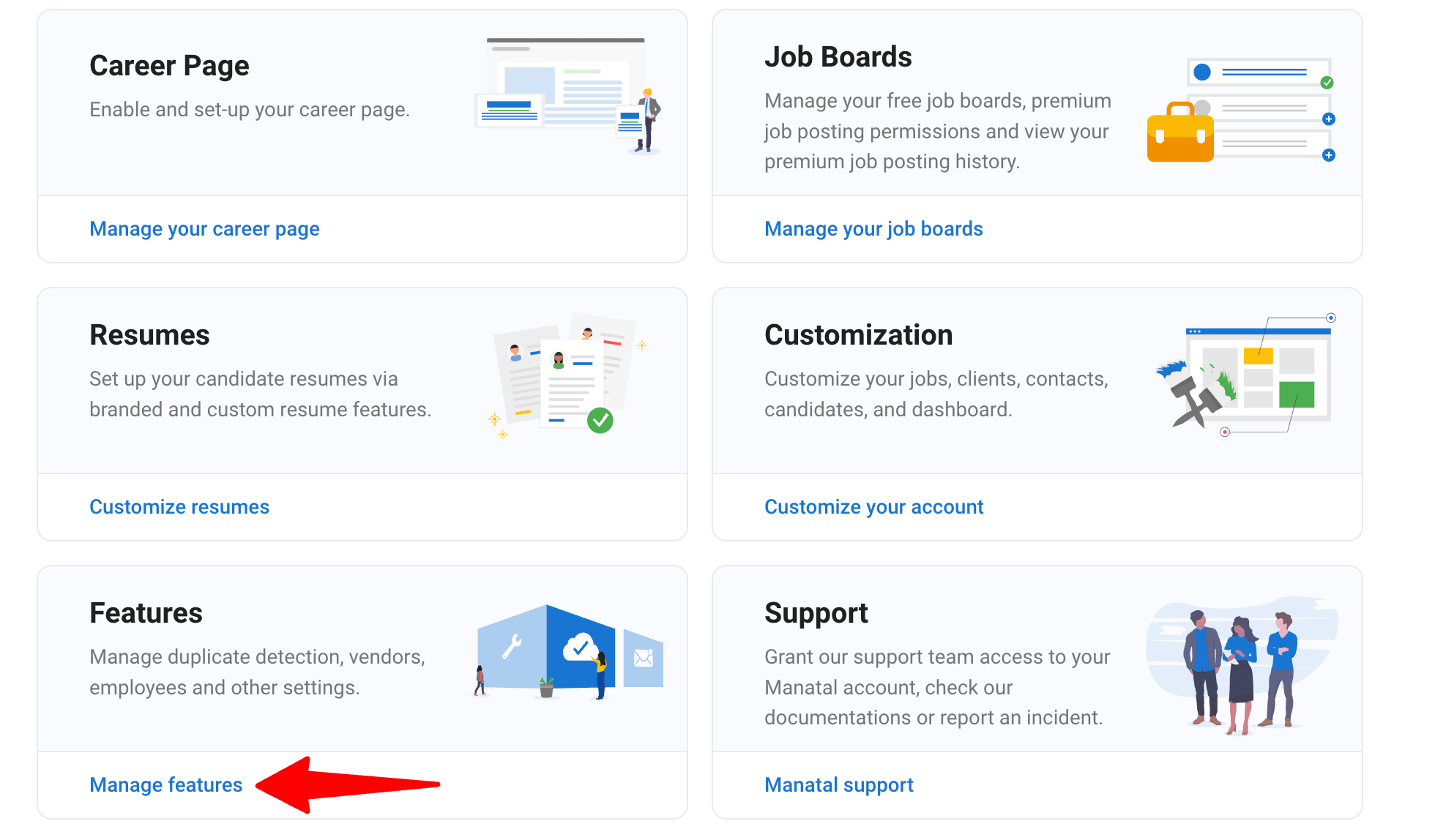
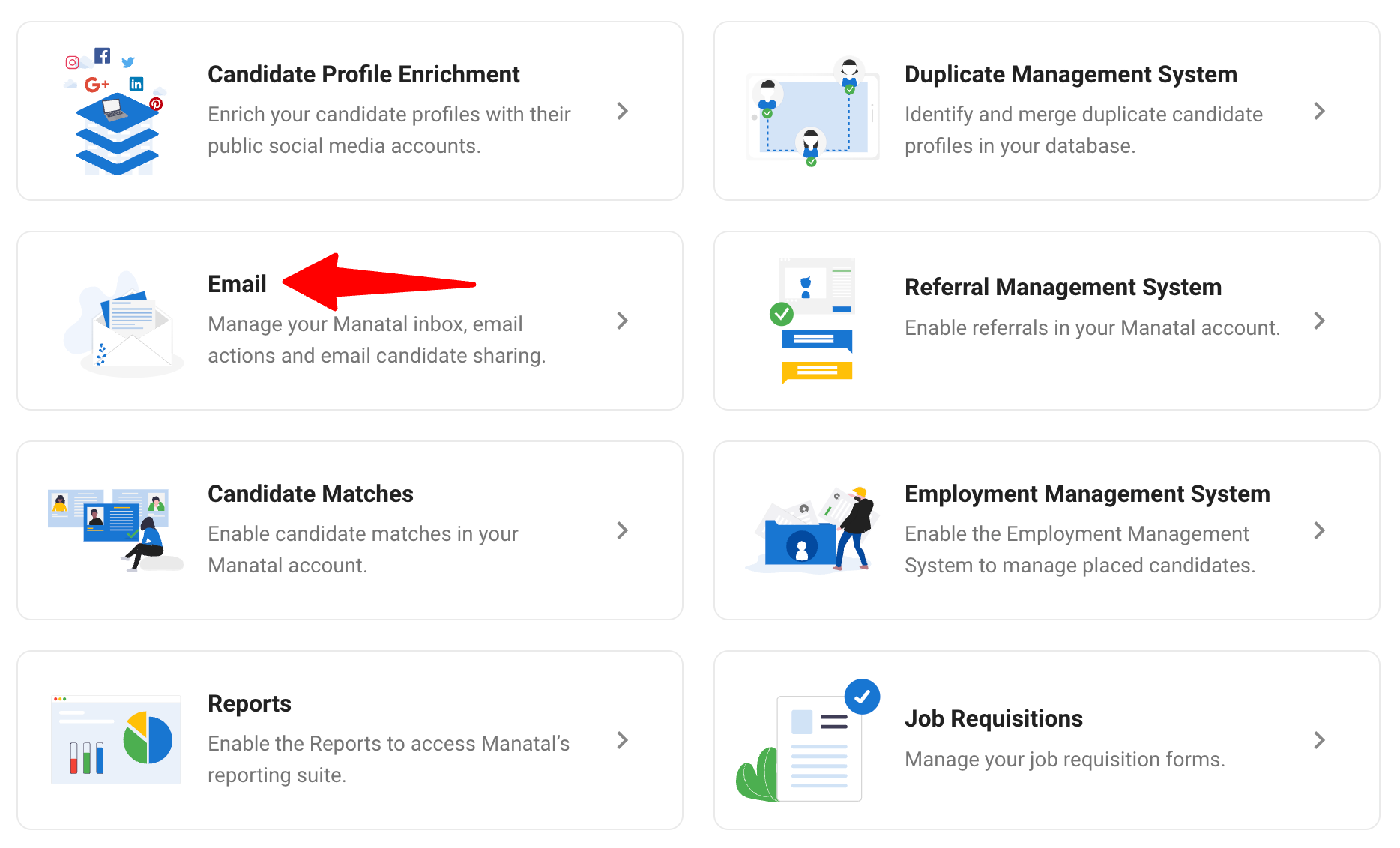
- Gehen Sie zur folgenden Seite. Alternativ klicken Sie in Ihrem Seitenmenü auf "Administration", öffnen Sie "Features", und wählen Sie dann "Email".
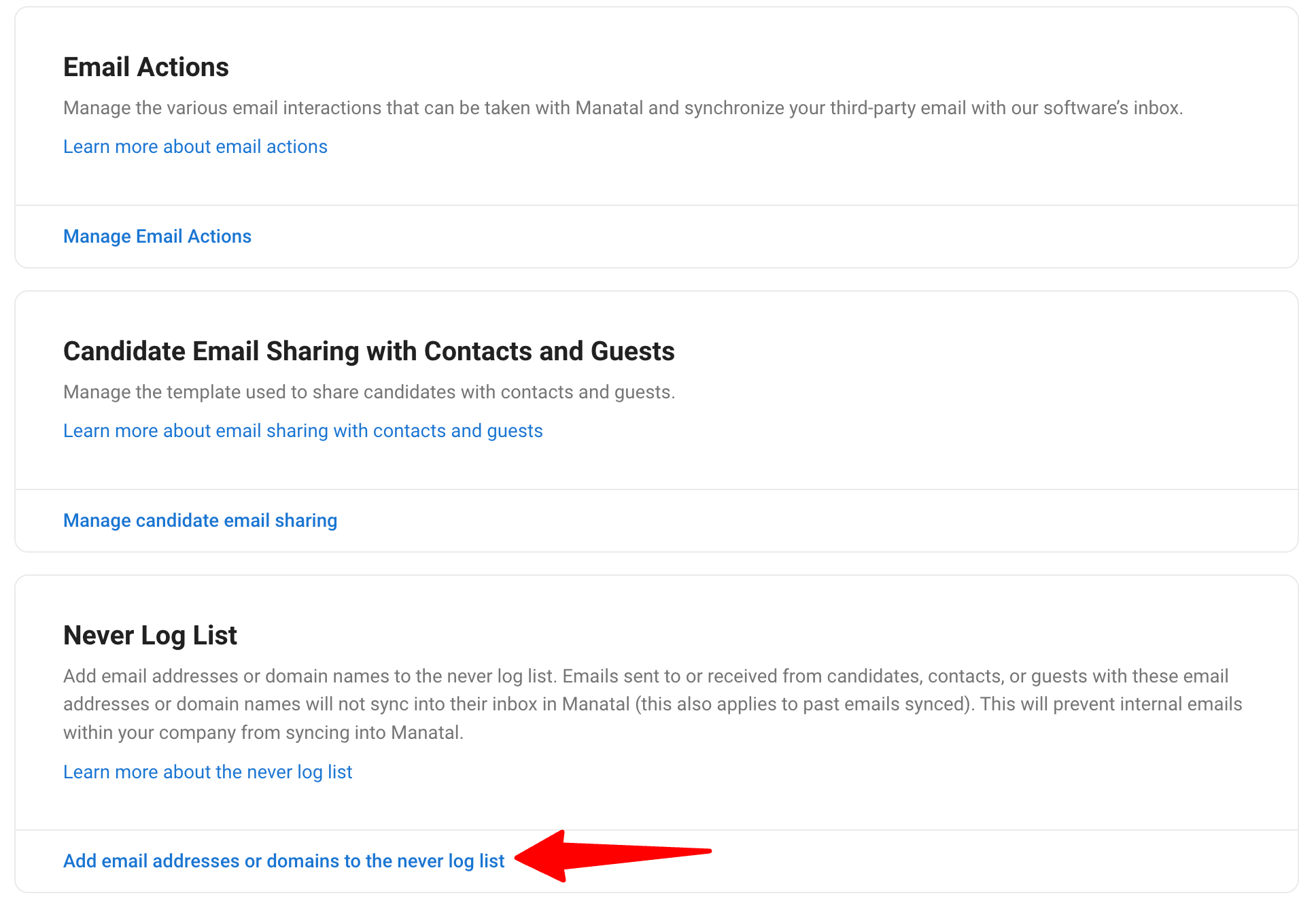
- Scrollen Sie zum Abschnitt Never Log List und klicken Sie auf "Add email addresses or domains to the never log list".
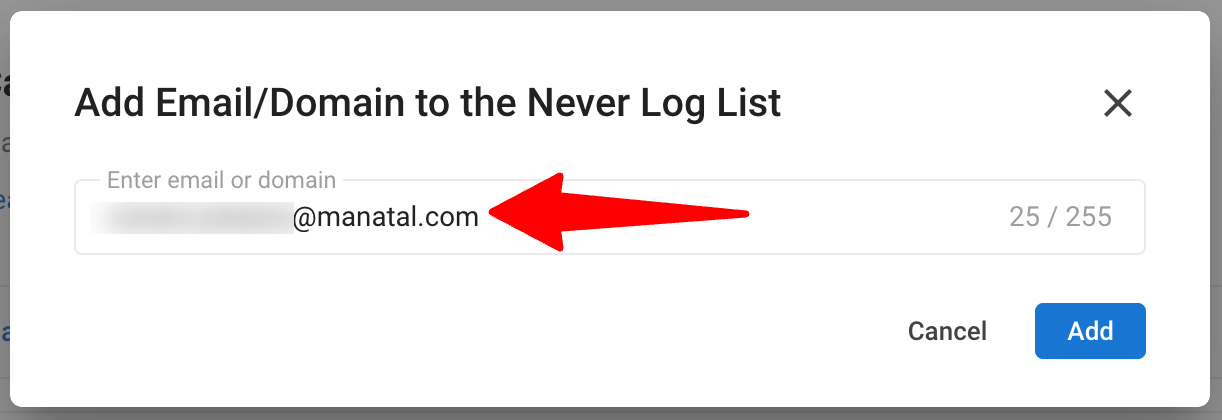
- Geben Sie im Pop-up-Fenster entweder Folgendes ein:
- Eine spezifische E-Mail-Adresse (z. B.
alex@apple.com) oder - Eine gesamte Domain (z. B.
manatal.com), um jede Adresse dieser Domain abzudecken.
Note- Domains vs. E-Mails: Ein Domain-Eintrag verhält sich genau wie ein E-Mail-Eintrag, nur umfassender. Jedes Profil, das eine Adresse dieser Domain verwendet, ist abgedeckt.
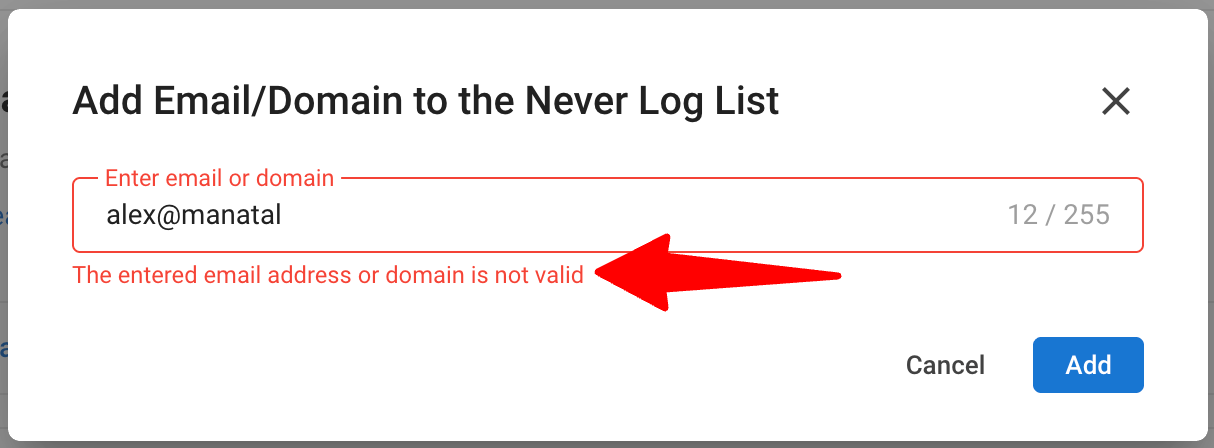
- Ungültige Einträge (z. B.
alex@manatalohne Domain-Endung) werden mit einer Fehlermeldung abgelehnt, und doppelte Einträge können nicht zweimal hinzugefügt werden.
- Eine spezifische E-Mail-Adresse (z. B.
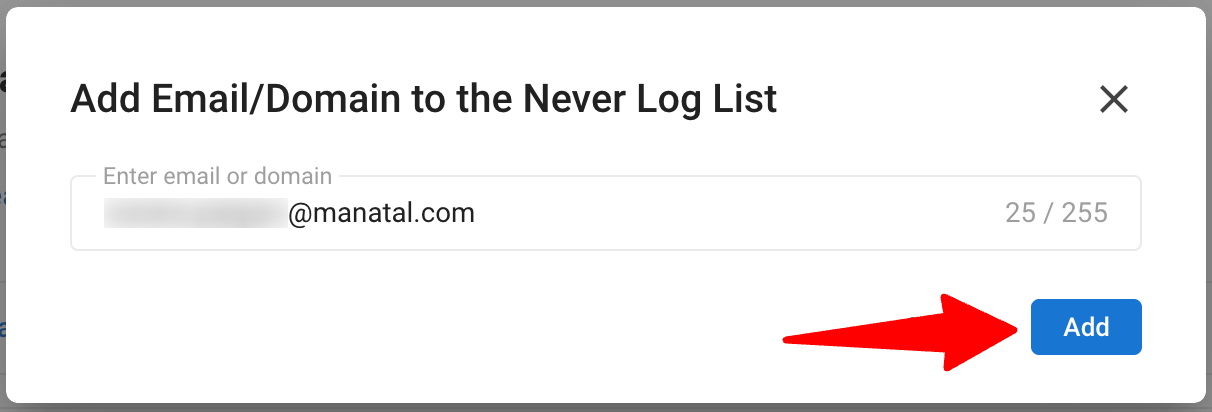
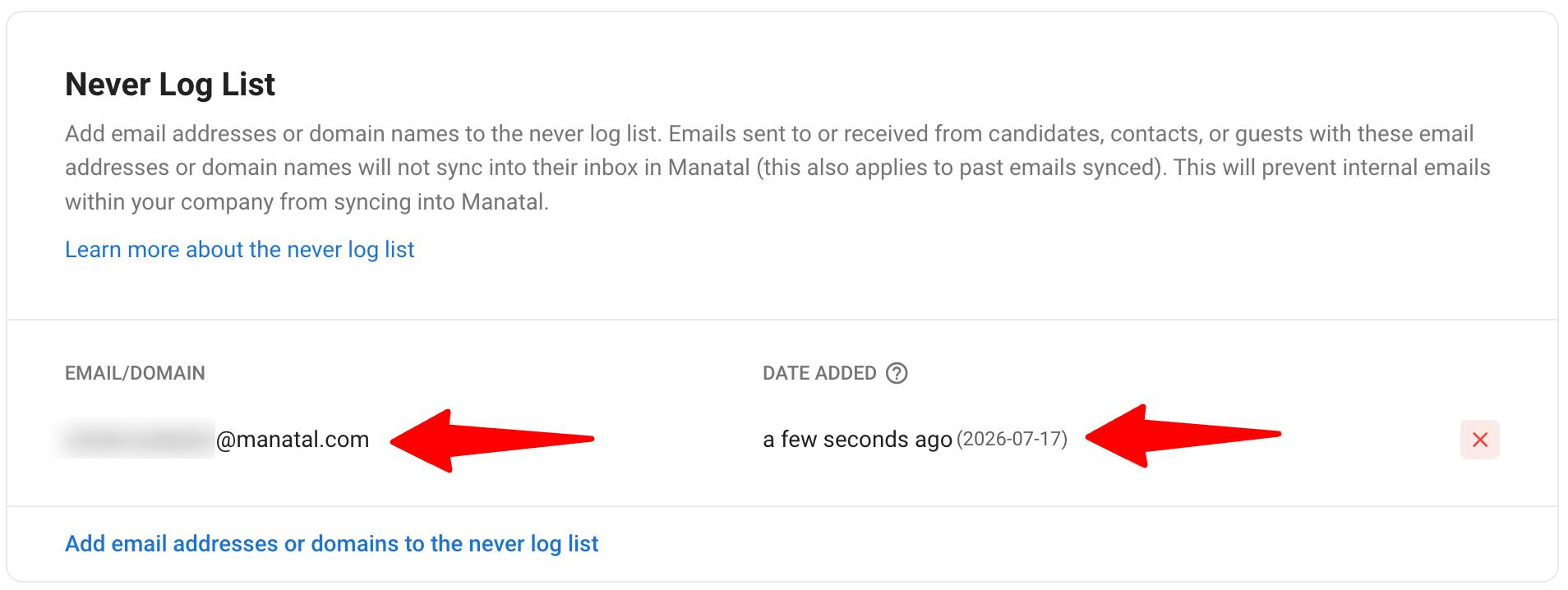
- Klicken Sie auf "Add". Der Eintrag wird gespeichert und erscheint zusammen mit dem Hinzufügedatum in der Liste.
Verwalten der Liste
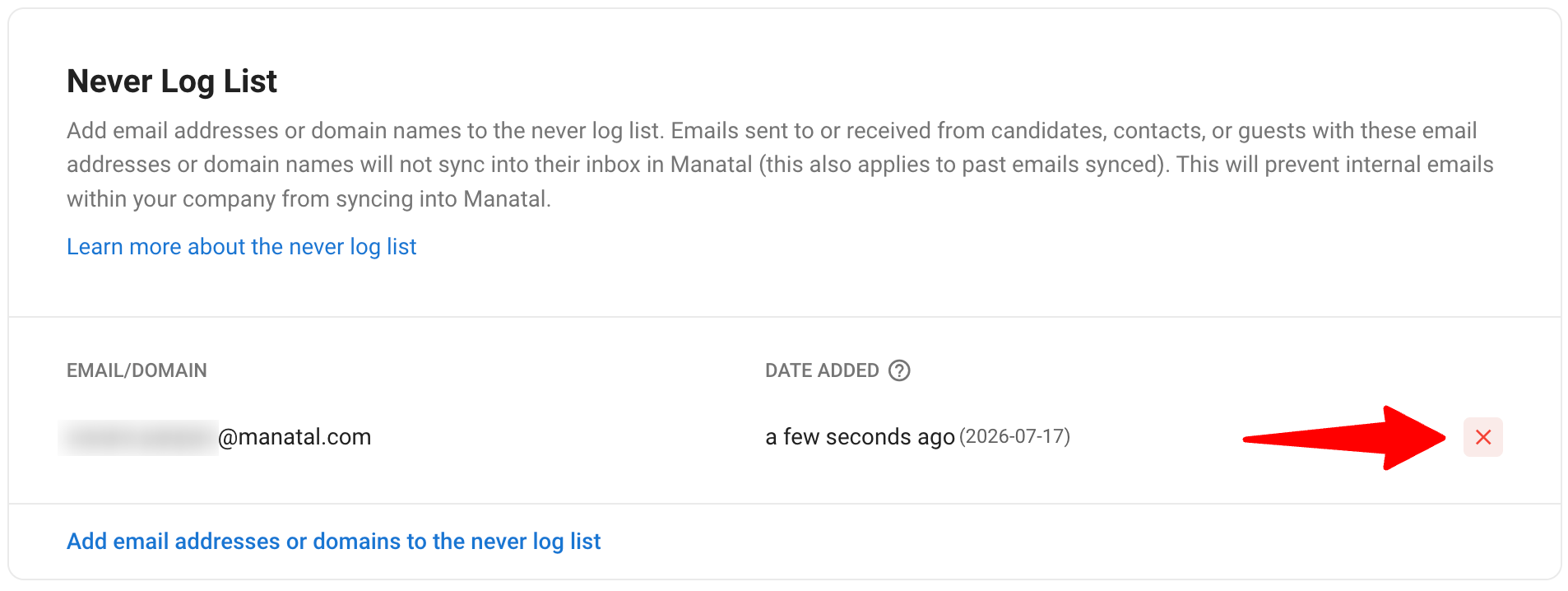
Auf derselben Seite zeigt die Never Log List jeden Eintrag mit seinem Hinzufügedatum an.
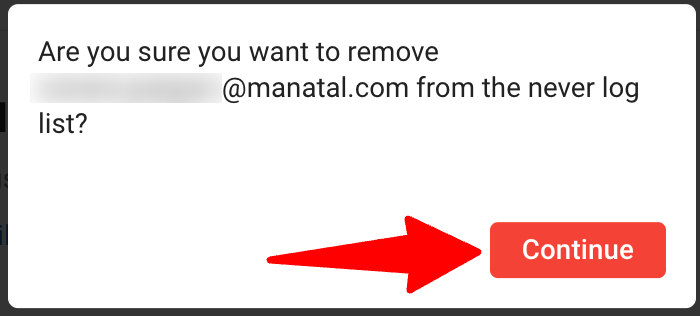
- Einen Eintrag entfernen: Klicken Sie auf das rote "X" neben einem Eintrag und bestätigen Sie die Entfernung. Sobald er entfernt wurde, werden alle E-Mails für die entsprechenden Profile sofort wieder sichtbar, einschließlich allem, was ausgeblendet war, während der Eintrag auf der Liste stand.
Wie Es Funktioniert
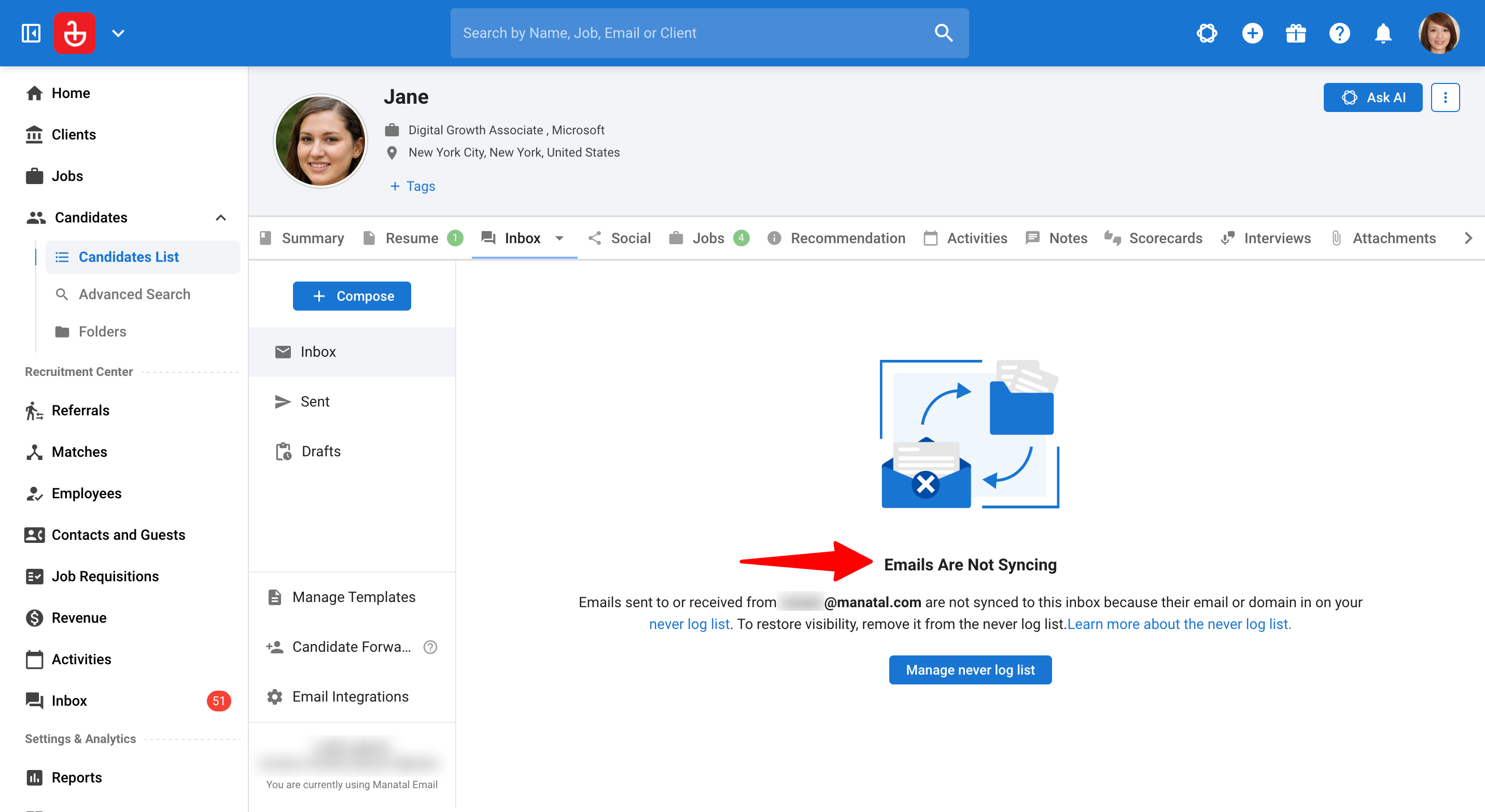
- Wenn die E-Mail-Adresse (oder deren Domain) eines Kandidaten-, Kontakt- oder Gast-Profils mit einem Eintrag auf der Liste übereinstimmt, zeigt der Tab Posteingang dieses Profils den Hinweis "Emails Are Not Syncing" an, der erklärt, dass die Adresse auf der Never Log List steht.
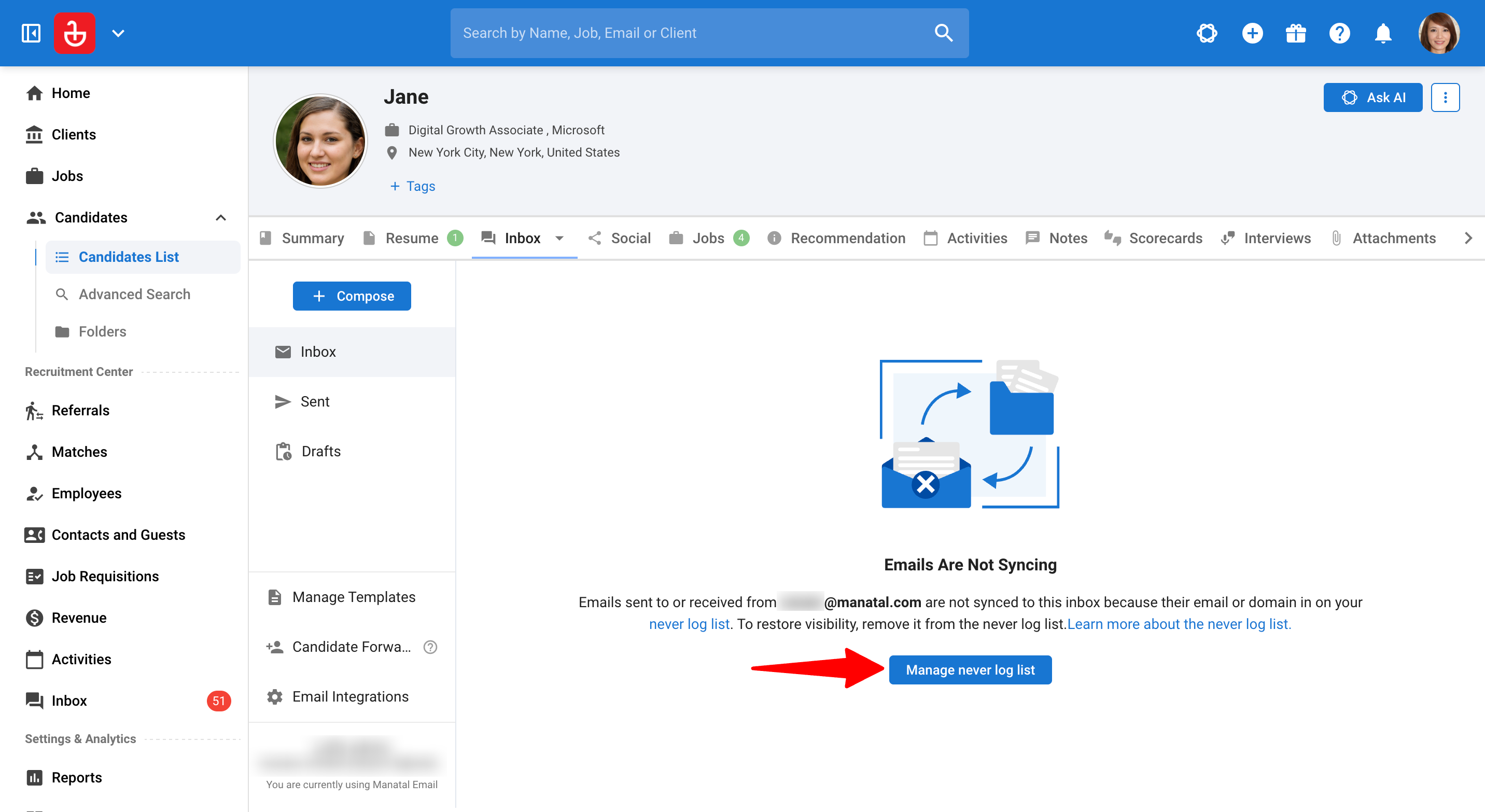
- Admins sehen außerdem eine Schaltfläche "Manage never log list", um direkt zu den Einstellungen zu springen.
Hier sind ein paar Beispiele. Angenommen, hiringmanager@acme.com steht auf Ihrer Never Log List:
- Anzeigen des eigenen Profils des Hiring Managers: Das Öffnen des Tabs Posteingang in dessen Gast-, Kontakt- oder Kandidaten-Profil zeigt keine E-Mails an, nur den Hinweis. Dies gilt für alle deren E-Mails, einschließlich derer, die synchronisiert wurden, bevor der Eintrag hinzugefügt wurde.
- Anzeigen eines Kandidaten, dem sie eine E-Mail gesendet haben: Wenn
hiringmanager@acme.comdem Kandidatendan@gmail.comeine E-Mail gesendet hat, ist dieser Thread im Posteingang-Tab des Kandidaten weiterhin vollständig sichtbar. Die Liste verbirgt nur den Posteingang des übereinstimmenden Profils; sie entfernt keine E-Mails von den anderen Personen in der Konversation. Jeder, der für einen Thread relevant ist, sieht diesen weiterhin in seinem zugehörigen Posteingang. - Hinzufügen der gesamten Domain: Wenn Sie stattdessen
acme.comhinzufügen, wird jedes Profil mit einer@acme.com-Adresse auf die gleiche Weise in einem Eintrag ausgeblendet. - Erstellen eines neuen Profils mit einer gelisteten Adresse: Wenn jemand einen neuen Kandidaten, Kontakt oder Gast mit einer Adresse auf der Liste erstellt, wird der Posteingang dieses Profils ebenfalls ausgeblendet. Dies verhindert, dass jemand ein gefälschtes Profil erstellt, nur um die privaten Threads von jemandem zu lesen.
- Ihr Benutzer-Posteingang: Niemals betroffen. Sie sehen Ihre eigenen gesendeten und empfangenen E-Mails immer in Ihrem persönlichen Posteingang, unabhängig von der Liste.
FAQ
1. Blockiert oder löscht die Never Log List E-Mails?
- Nein. E-Mails werden weiterhin normal verarbeitet, gespeichert und verknüpft. Die Liste steuert nur, wo sie angezeigt werden. Das Entfernen eines Eintrags stellt die volle Sichtbarkeit sofort wieder her.
2. Für welche Posteingänge gilt dies?
- Nur für den Tab Posteingang in Kandidaten-, Kontakt- und Gast-Profilen. Es gilt niemals für Ihren persönlichen Benutzer-Posteingang. Beachten Sie unsere Leitfäden zu Kandidaten, Kontakten und Gästen.
3. Werden E-Mails ausgeblendet, die synchronisiert wurden, bevor ich den Eintrag hinzugefügt habe?
Ja. Sobald eine Adresse oder Domain auf der Liste steht, wird der Posteingang des entsprechenden Profils vollständig ausgeblendet, einschließlich vergangener E-Mails.
4. Wenn eine gelistete Person einem Kandidaten eine E-Mail gesendet hat, kann ich diesen Thread dann noch sehen?
- Ja. Der Thread bleibt im Posteingang-Tab des zugehörigen Kandidaten sichtbar. Das Ausblenden erfolgt nur auf dem Profil, dessen eigene Adresse mit der Liste übereinstimmt.
5. Wer kann die Never Log List verwalten?
- Nur Admins können Einträge hinzufügen oder entfernen. Admins sehen außerdem eine Verknüpfung "Manage never log list" bei ausgeblendeten Posteingängen; andere Benutzer sehen den Hinweis ohne die Verknüpfung.
6. Wie viele Einträge kann ich hinzufügen?
- Die Liste unterstützt insgesamt bis zu 25 E-Mail-Adressen und Domains. Ein Domain-Eintrag deckt jede Adresse dieser Domain ab, verwenden Sie also Domains, um die Liste kompakt zu halten.
7. Was passiert, wenn ich einen Eintrag entferne?
- Alle E-Mails für die entsprechenden Profile werden wieder angezeigt, ohne Lücken. Nichts geht verloren, während ein Eintrag auf der Liste steht.