This feature is currently in Beta. You may expect updates, and changes to accessibility or pricing as we refine and enhance it. We value your patience and welcome any feedback you may have. Thank you for being an early adopter!
What is Manatal’s AI Copilot?
Manatal’s AI Copilot is your AI-powered assistant built directly into Manatal. It helps recruiters and hiring teams work faster, stay focused, and make better-informed decisions by transforming existing Manatal data into clear summaries, insights, and suggestions exactly where you already work.
Instead of manually reading long candidate profiles, job descriptions, or job pipelines, simply ask AI Copilot questions in natural language and get instant, context-aware answers.
Manatal’s AI Copilot is an in-app assistant that helps you:
- Quickly understand candidate profiles without manual review
- Review job requirements and expectations at a glance
- Analyze candidate-to-job fit and identify gaps
- Compare candidates consistently and objectively
- Prepare for interviews more efficiently
- Reduce repetitive reading and summarization work
- Work on longer tasks in a dedicated full page view
- Return to past conversations without starting over
Where to use AI Copilot
AI Copilot is available directly within your Manatal workspace and adapts based on where it is opened.
1. Candidate Profile
When opened from a candidate profile, Copilot understands:
- Candidate personal details, work experience, education, & skills
- Associated notes and candidate email conversations (if available)
This is useful for:
- Quickly understanding a new candidate
- Reviewing a profile before a call or interview
- Sharing summaries internally
- Understanding past interactions, feedback, and communication history
- Sharing more complete summaries internally
2. Job Summary
When opened from a job summary, Copilot understands:
- Job description and responsibilities
This helps you:
- Review job requirements quickly
- Refine or rewrite job descriptions
- Align on expectations internally
3. Matches (Job Pipeline)
When opened from a match in the job pipeline, Copilot understands:
- The candidate details
- The job details
- The current pipeline stage and match details
This combined context allows Copilot to:
- Assess candidate fit for the role
- Identify strengths and gaps
- Support shortlist and pipeline reviews
4. Organizations
Copilot can access company details (industry, website, location, etc.) and related notes.
This is useful for:
- Quick account research
- Preparing for client calls
- Understanding context across jobs and pipeline
5. Notes and Candidate Emails
Copilot can summarize notes and candidate email threads and extract action items.
When viewing a candidate or match, this context may also be automatically included to improve responses and insights.
This is useful for:
- Summarizing discussions
- Tracking next steps
- Drafting replies
- Providing more context-aware candidate evaluations and summaries
6. Copilot Full Page
The full page view is currently available only on desktop.
Open AI Copilot in its own dedicated page for longer or more detailed work, such as comparing candidates, preparing client summaries, or multi-step conversations.
The full page includes:
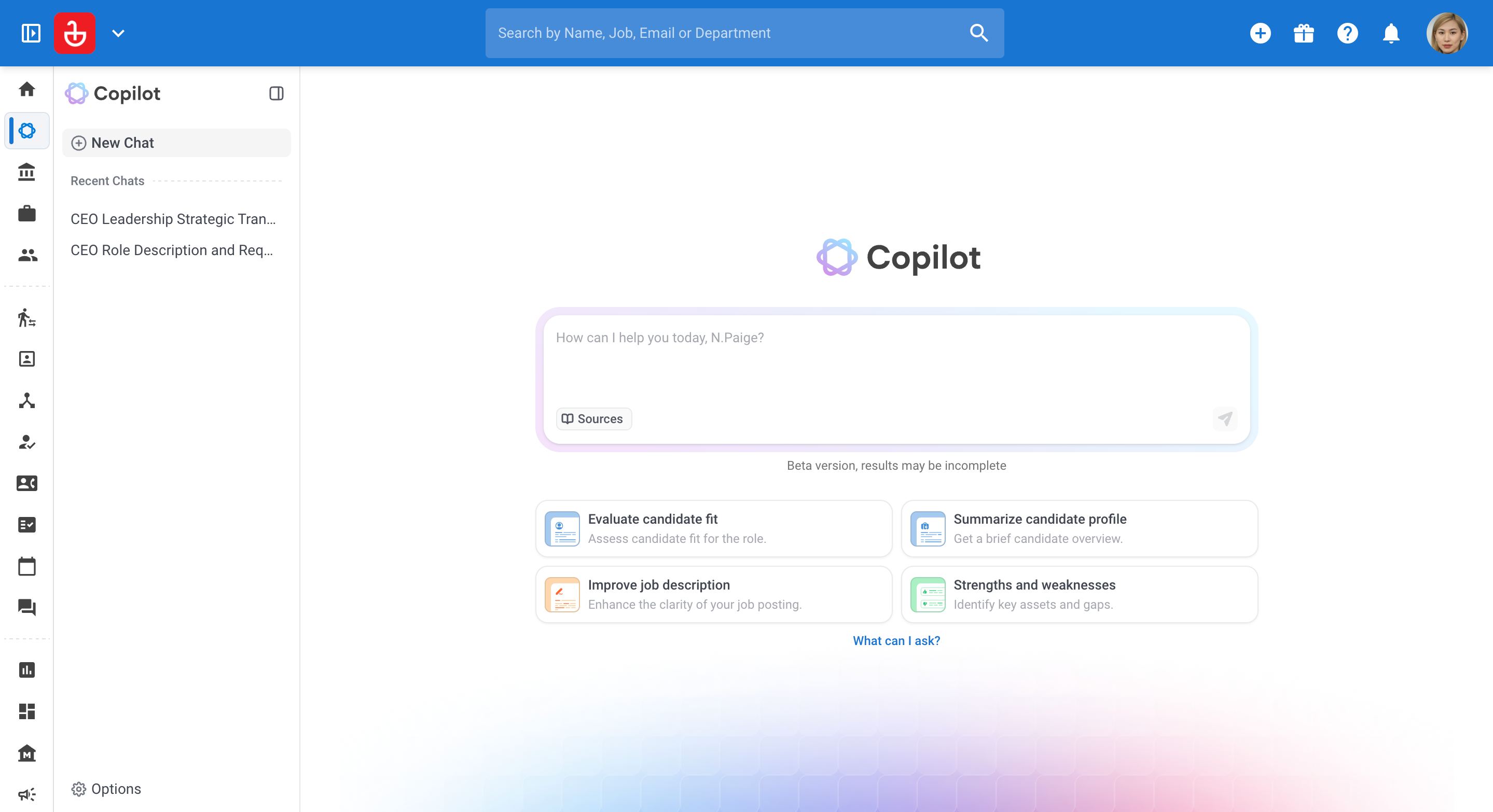
- A "New Chat" button to start a fresh conversation
- A 'Recent Chats' list of your past conversations
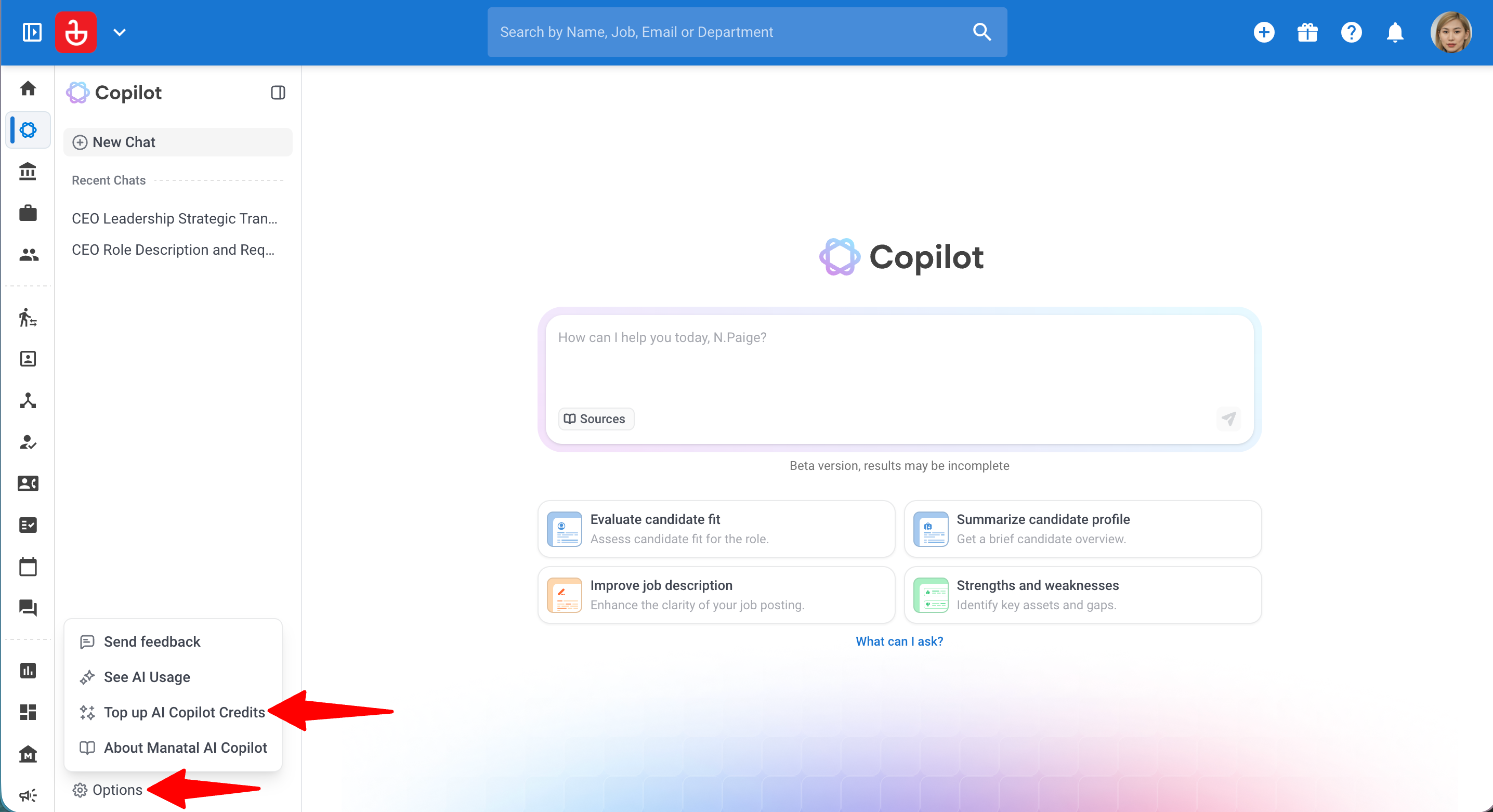
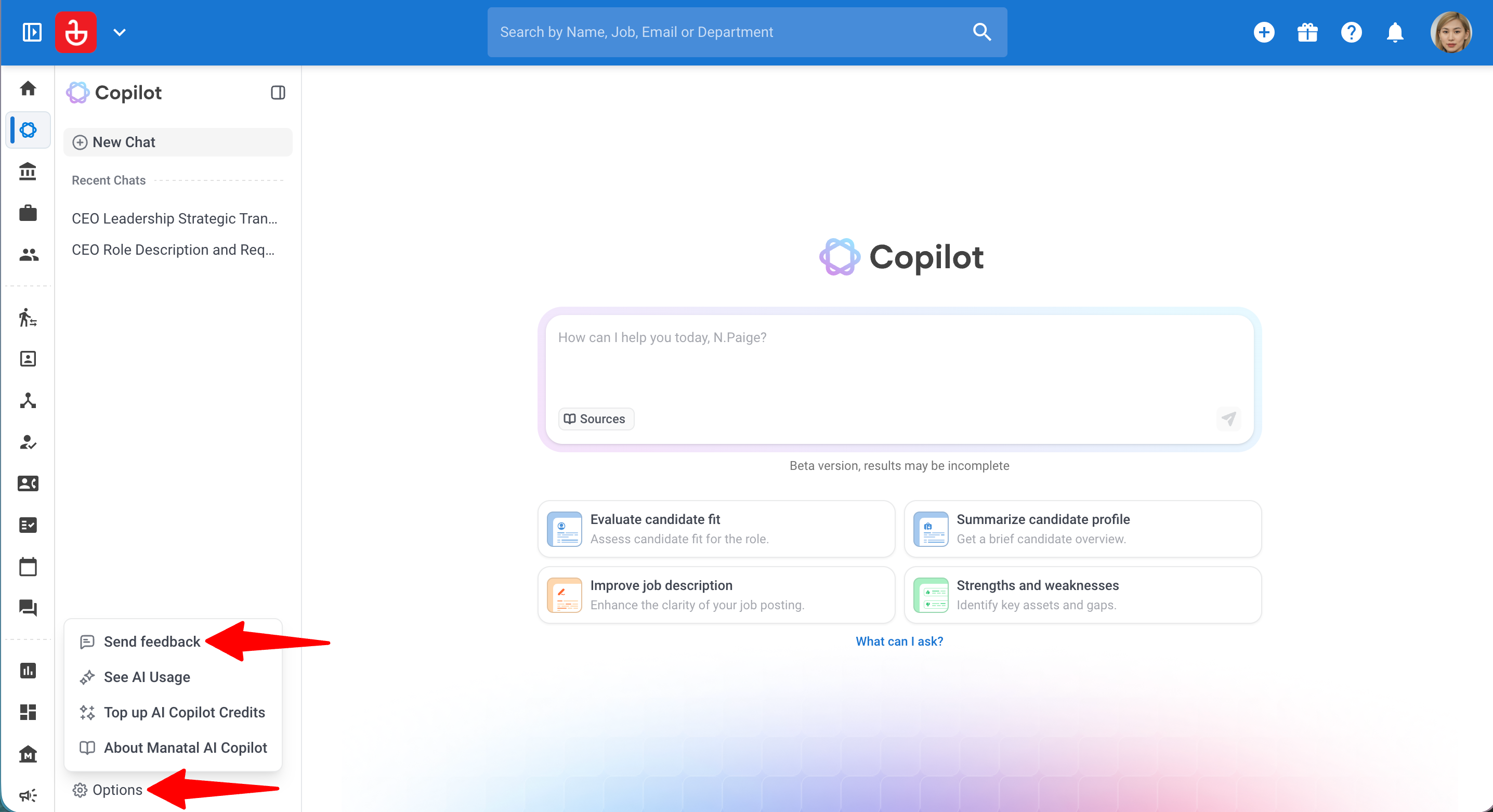
- An 'Options' menu at the bottom of the side menu
- A wider, centered conversation area that is easier to read
You can collapse the Copilot side menu using the toggle at the top of the menu to give your conversation more space.
Getting Started with AI Copilot
Step 1: Open AI Copilot
- There are two ways you can open AI Copilot:
i. In the side panel: Navigate to the Ask AI icon in the navbar, or to the Candidates, Jobs, or Organization menu from your side menu and open the desired candidate, job, match in a job pipeline or organization.
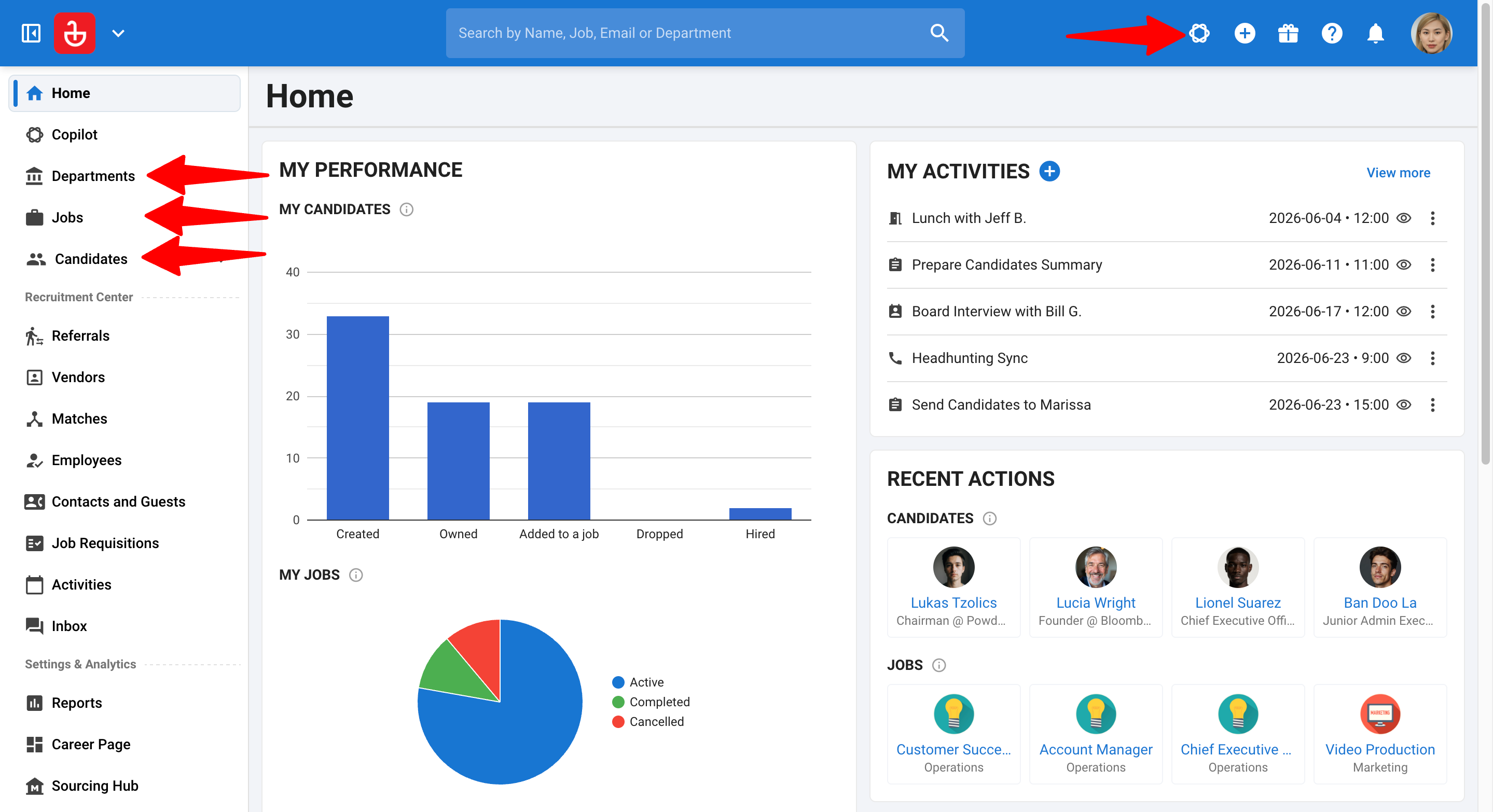
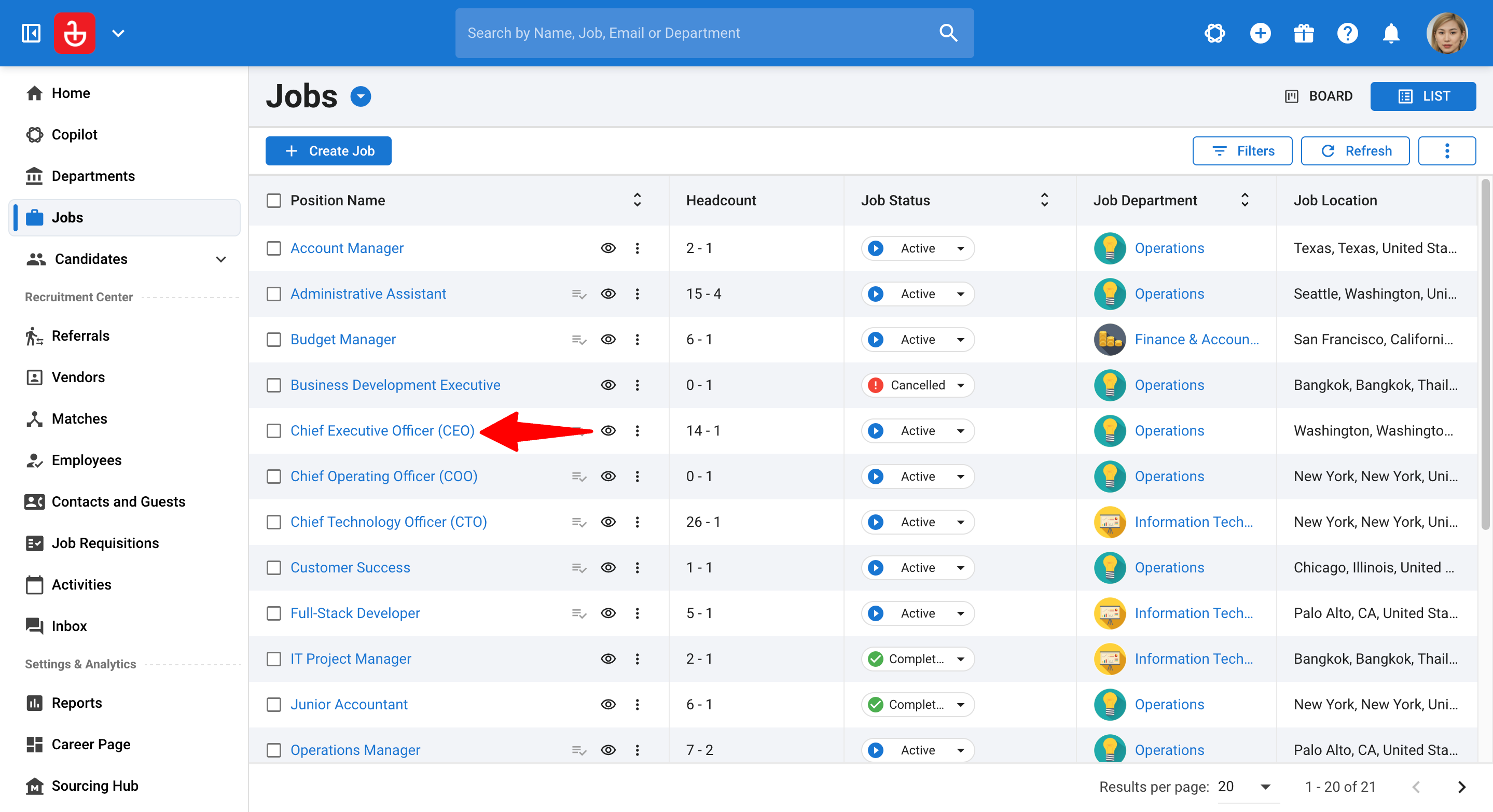
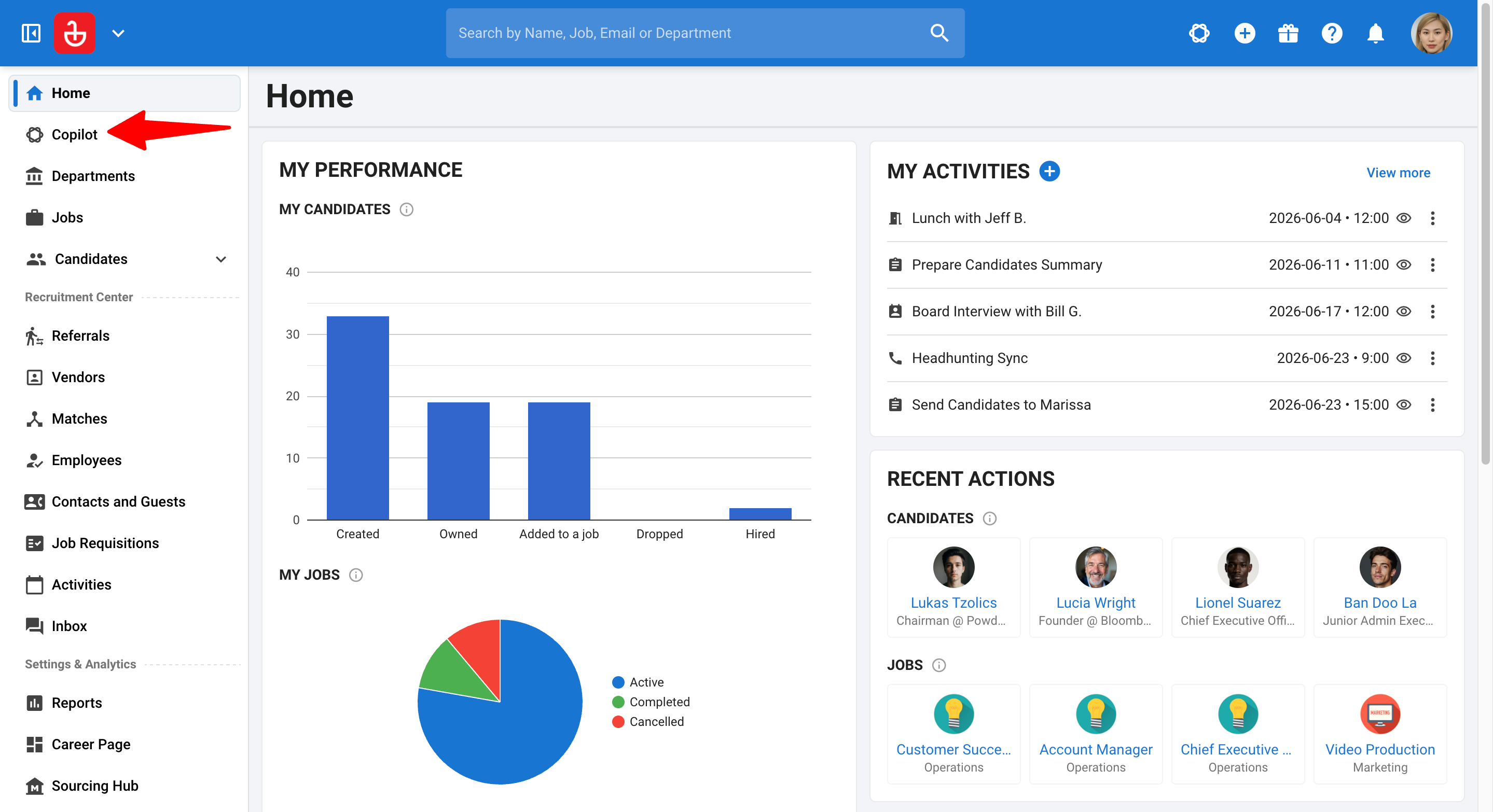
ii. In full page: Click on Copilot in the side menu.
- i. In the side panel: Click the Ask AI icon in the navbar or in the header of the candidate, job, or organization.
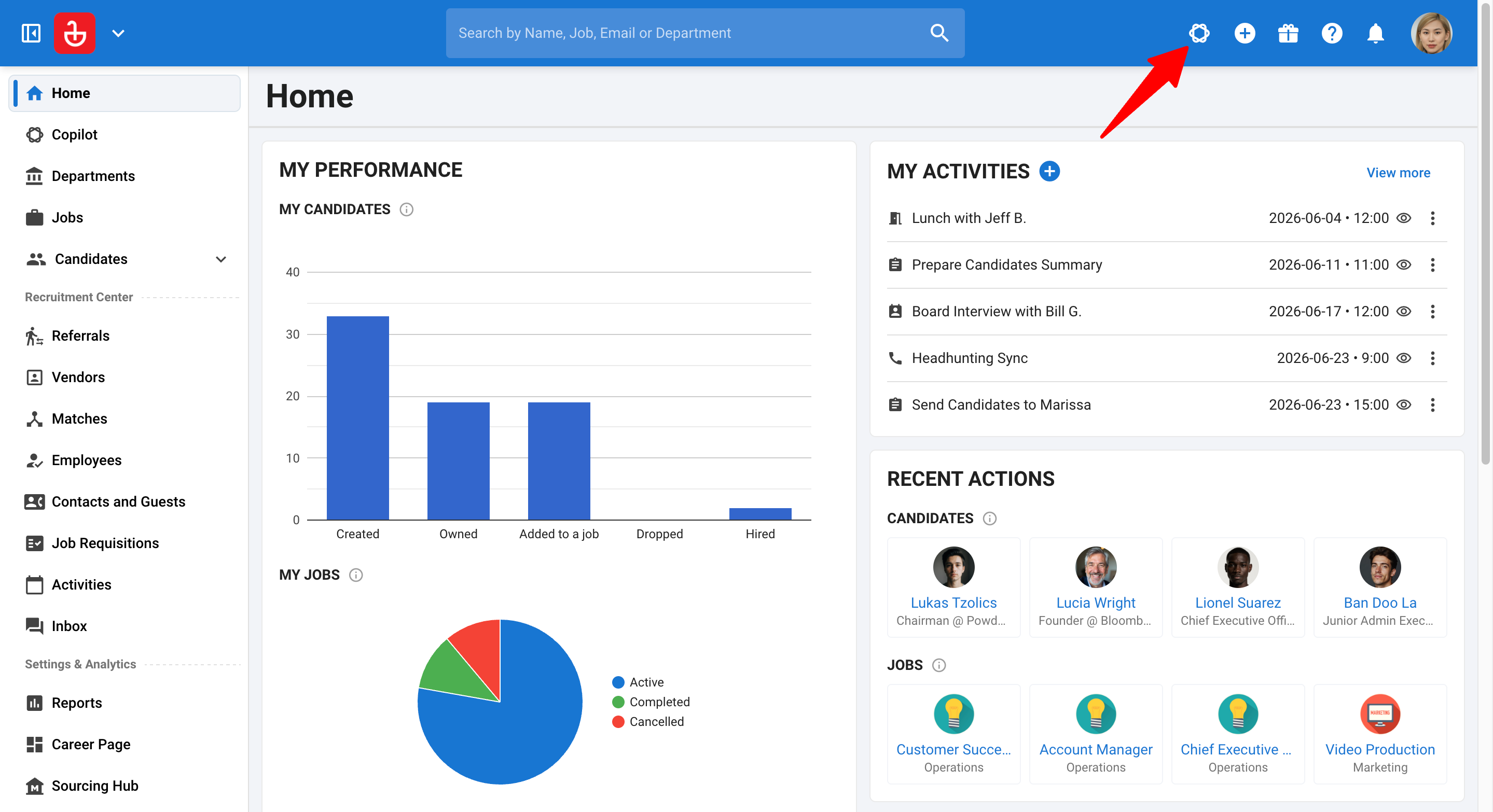

The Copilot panel opens on the right side of your screen.
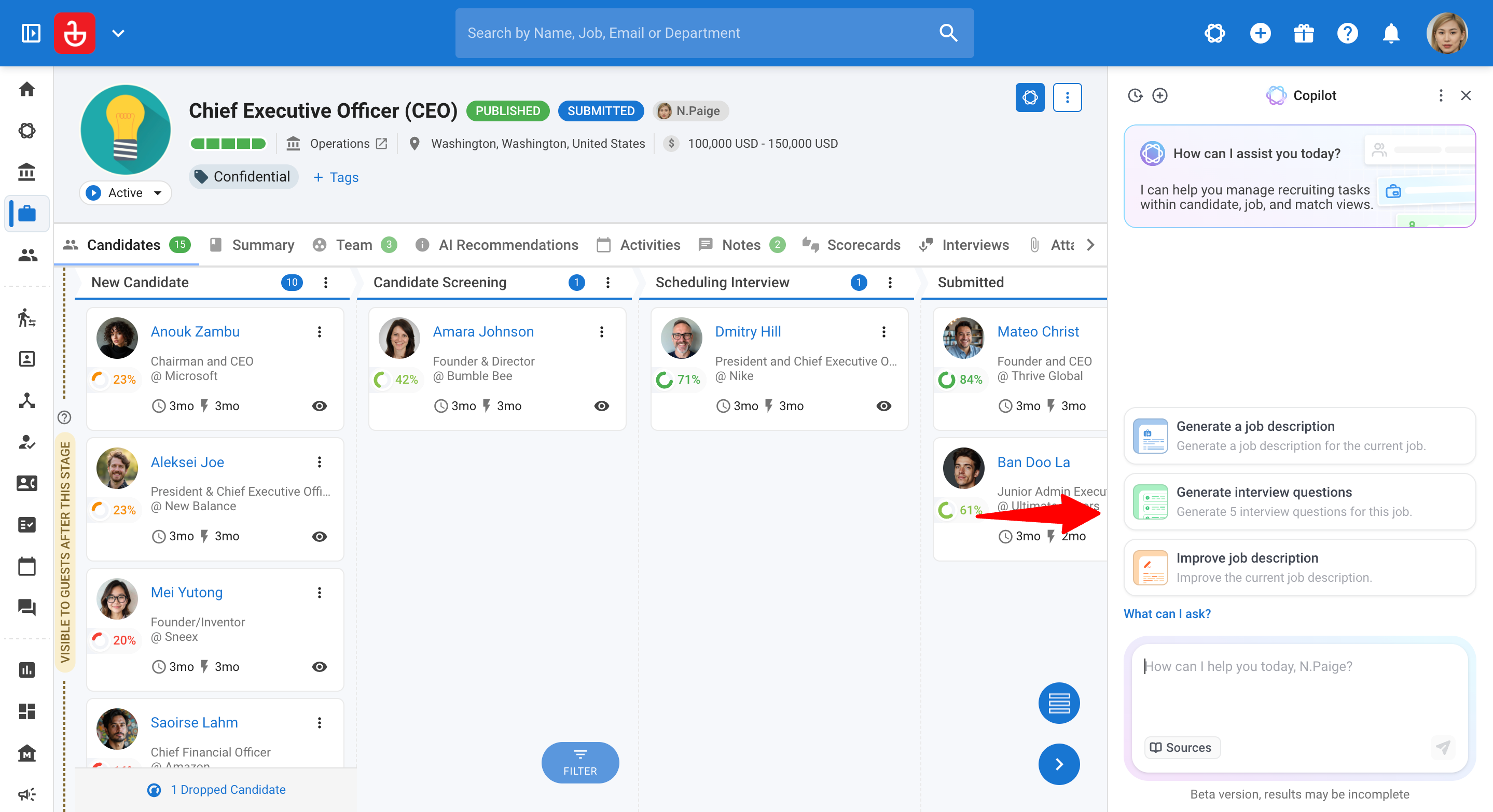
ii. In full page: AI Copilot opens as a full page.
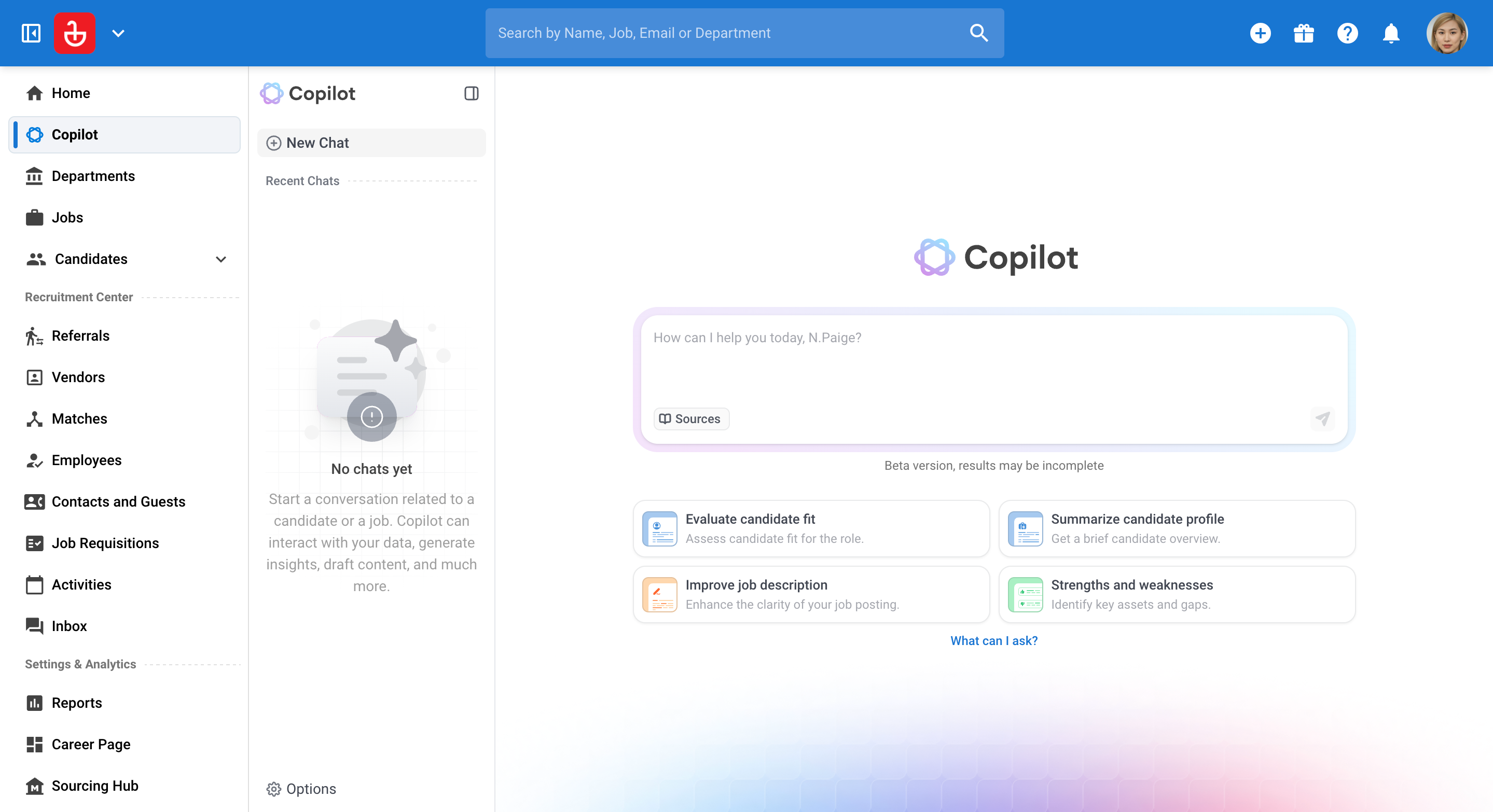
Step 2: Ask a question
- Type a question or instruction, such as:
- “Summarize this candidate.”
- “Is this candidate a good fit for the role?”
- “Prepare interview questions for this job.”
AI Copilot automatically detects the context and responds accordingly.
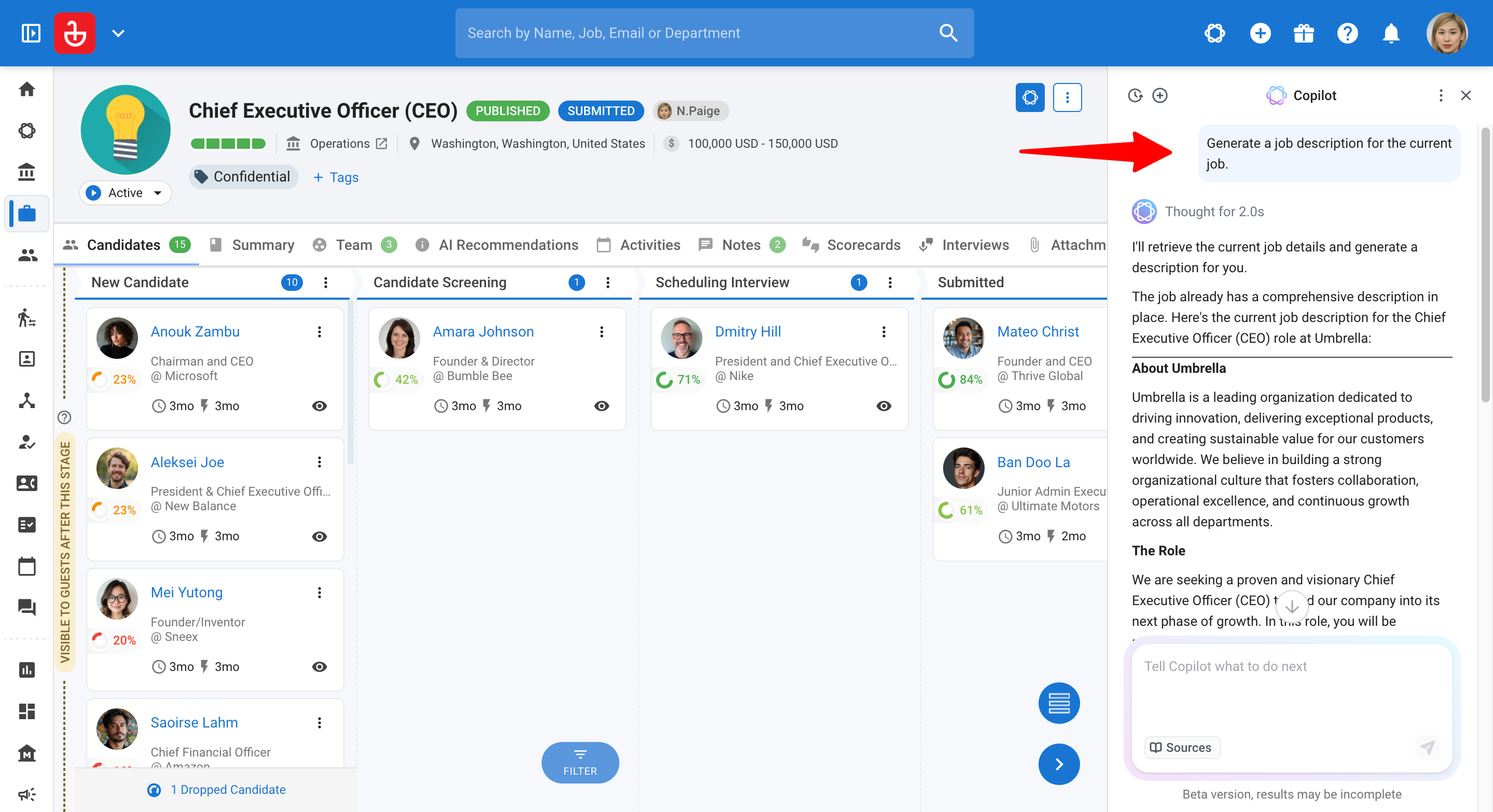
Step 3: Refine with follow-up prompts
Treat it like a conversation. Use follow-up prompts to:
- Dig deeper into specific areas
- Compare candidates
- Adjust format, tone, or level of detail
Step 4: View and manage your chat history
AI Copilot saves your past conversations so you can come back to them later. Each chat is given a short title based on your first question and Copilot's first response.
To view past chats:
- In the side panel: Click the "History" button beside "New Chat".
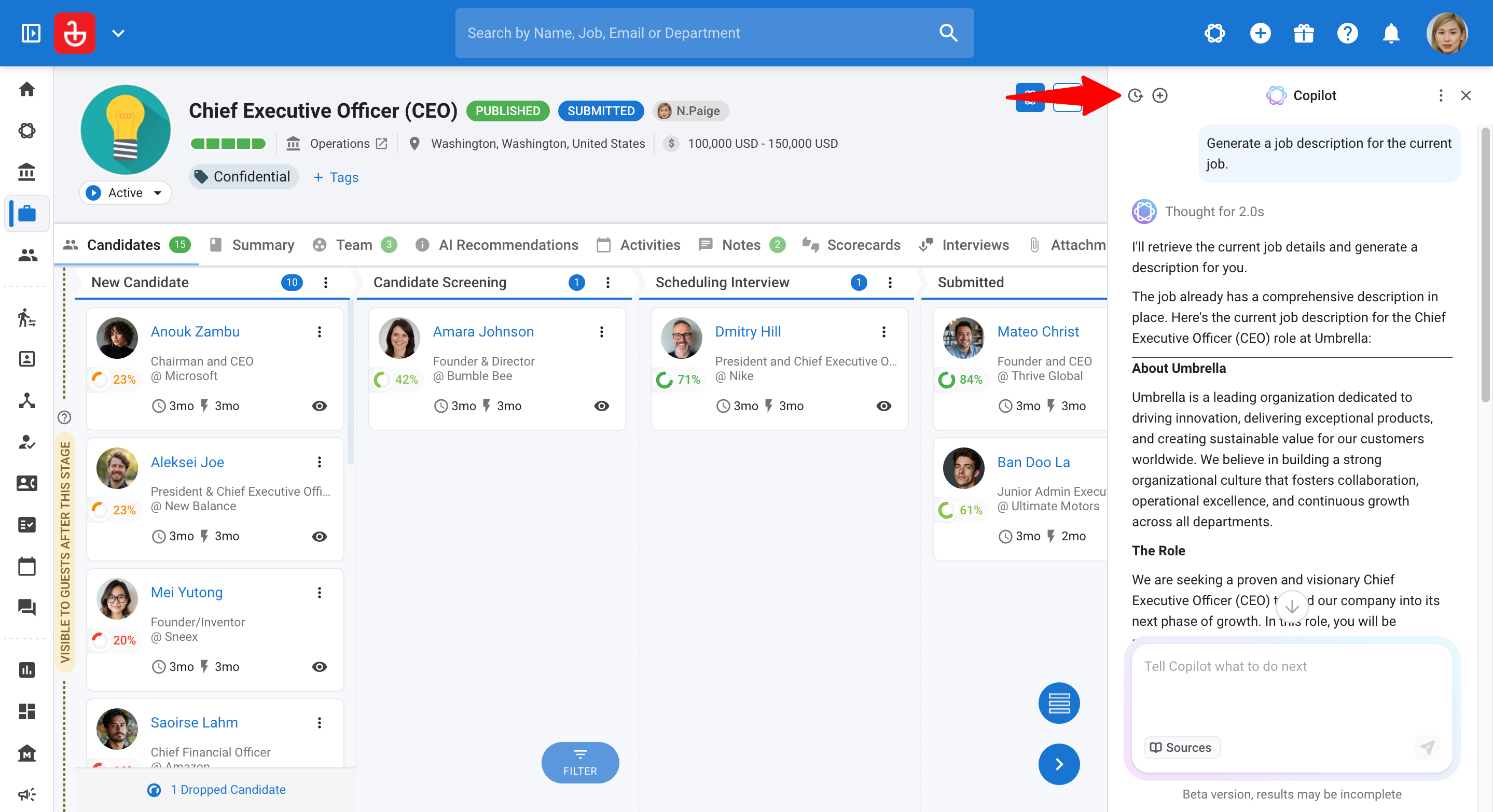
- In full page: Your chats appear under Recent Chats in the side menu.
Note
Your 10 most recent chats are shown first. Click "Load more" to see older chats.
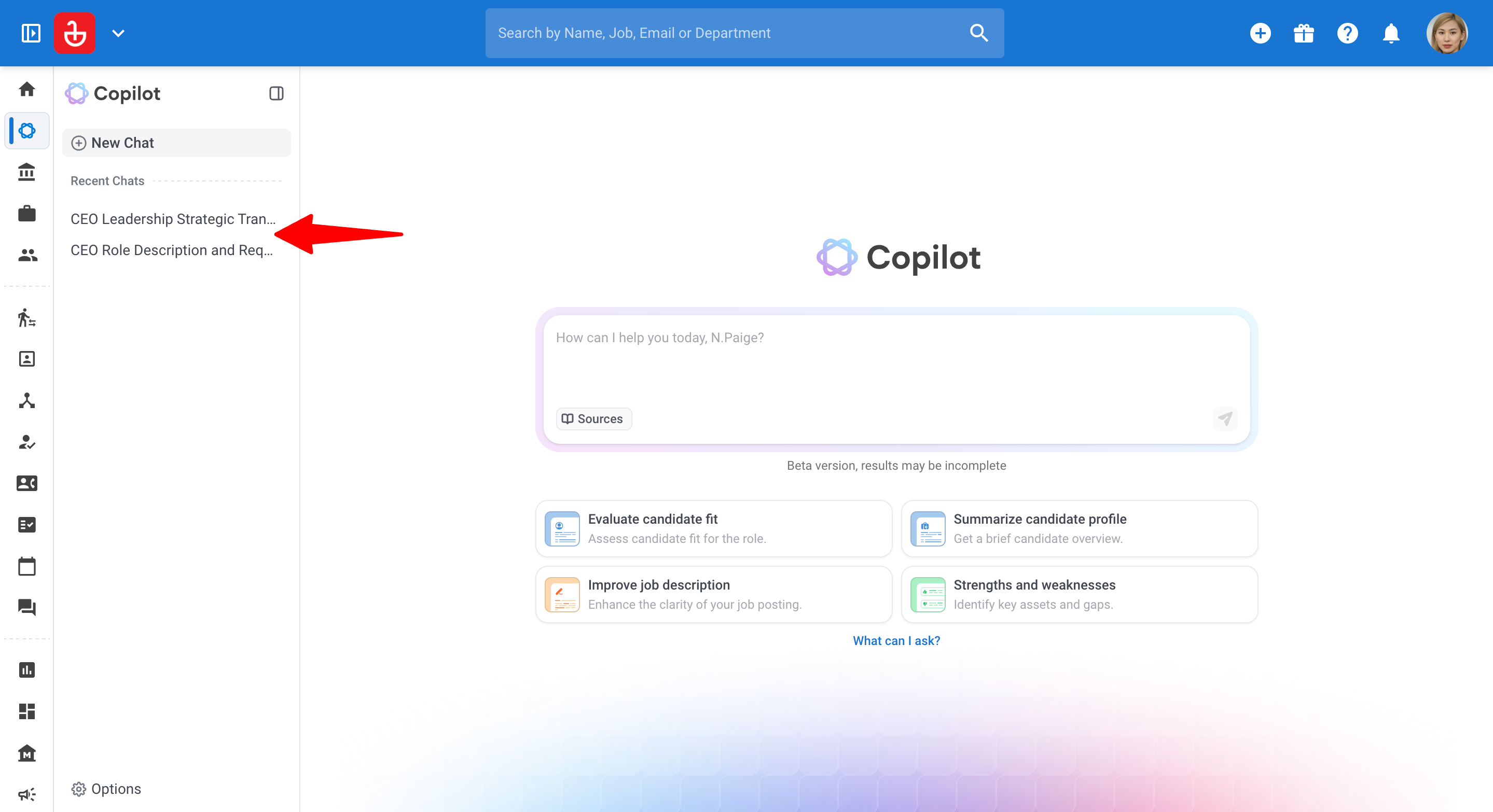
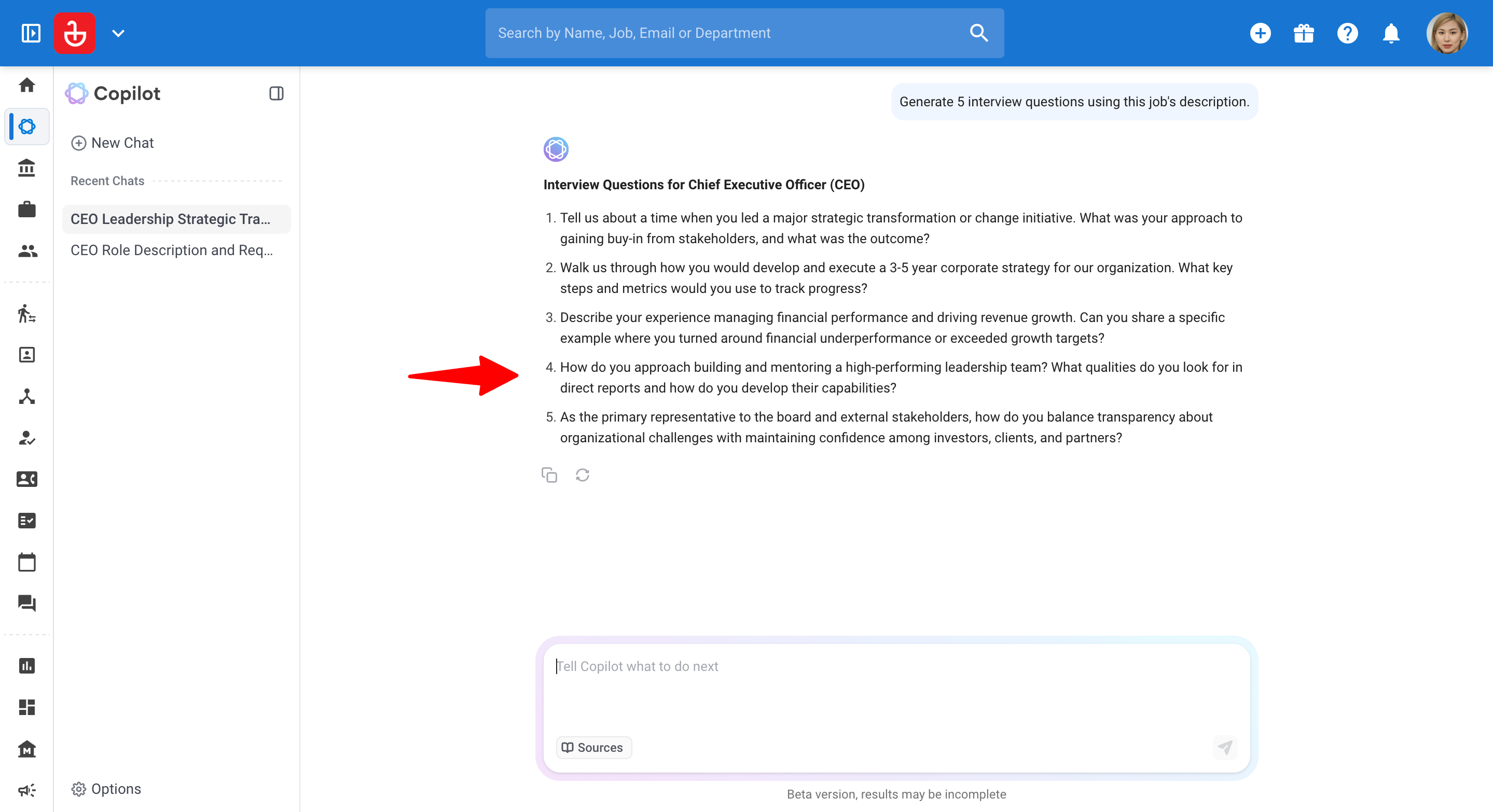
To reopen a chat:
- Click on the chat in your history.
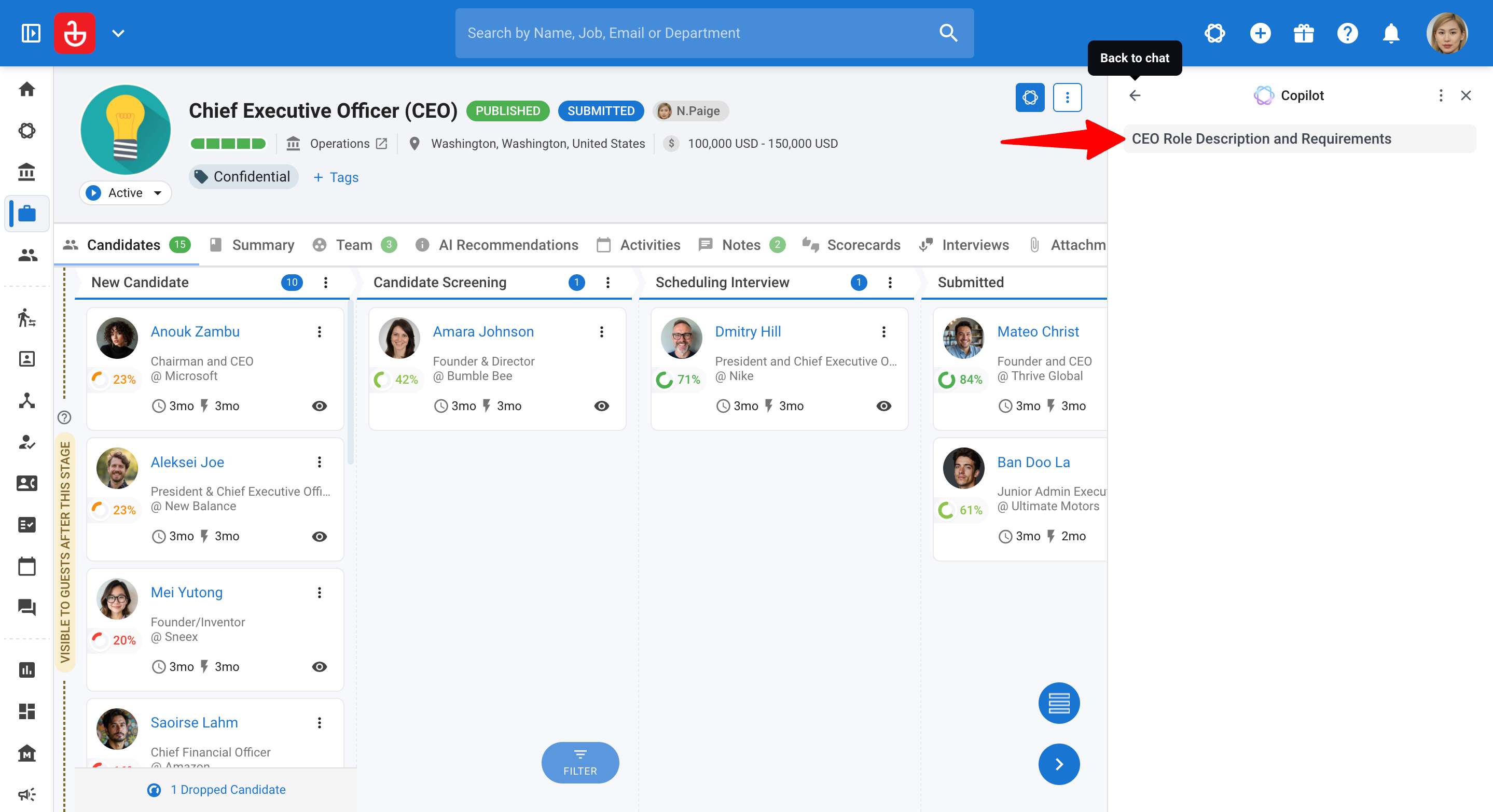
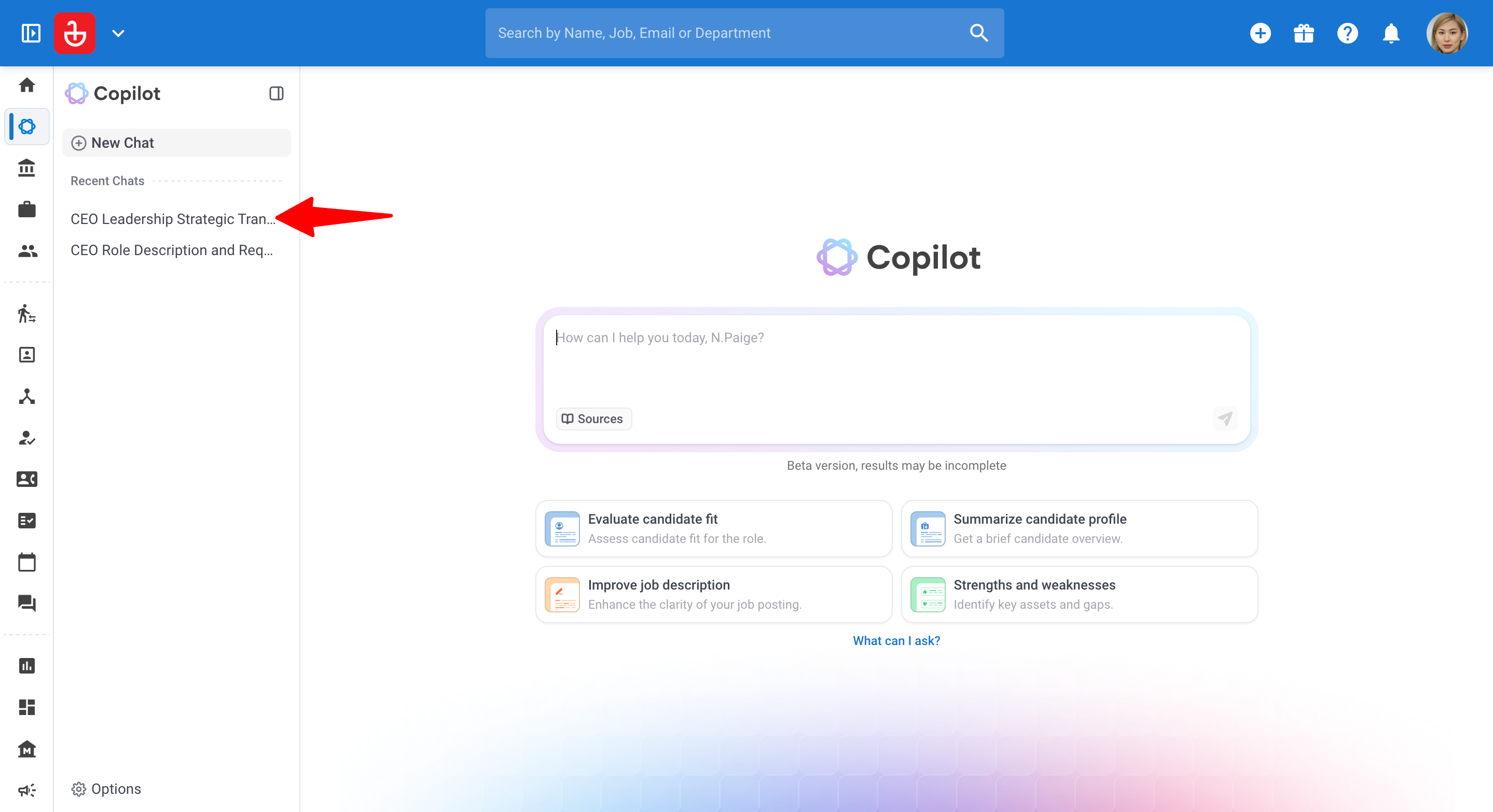
- The full conversation opens, including your previous prompts and Copilot's responses.
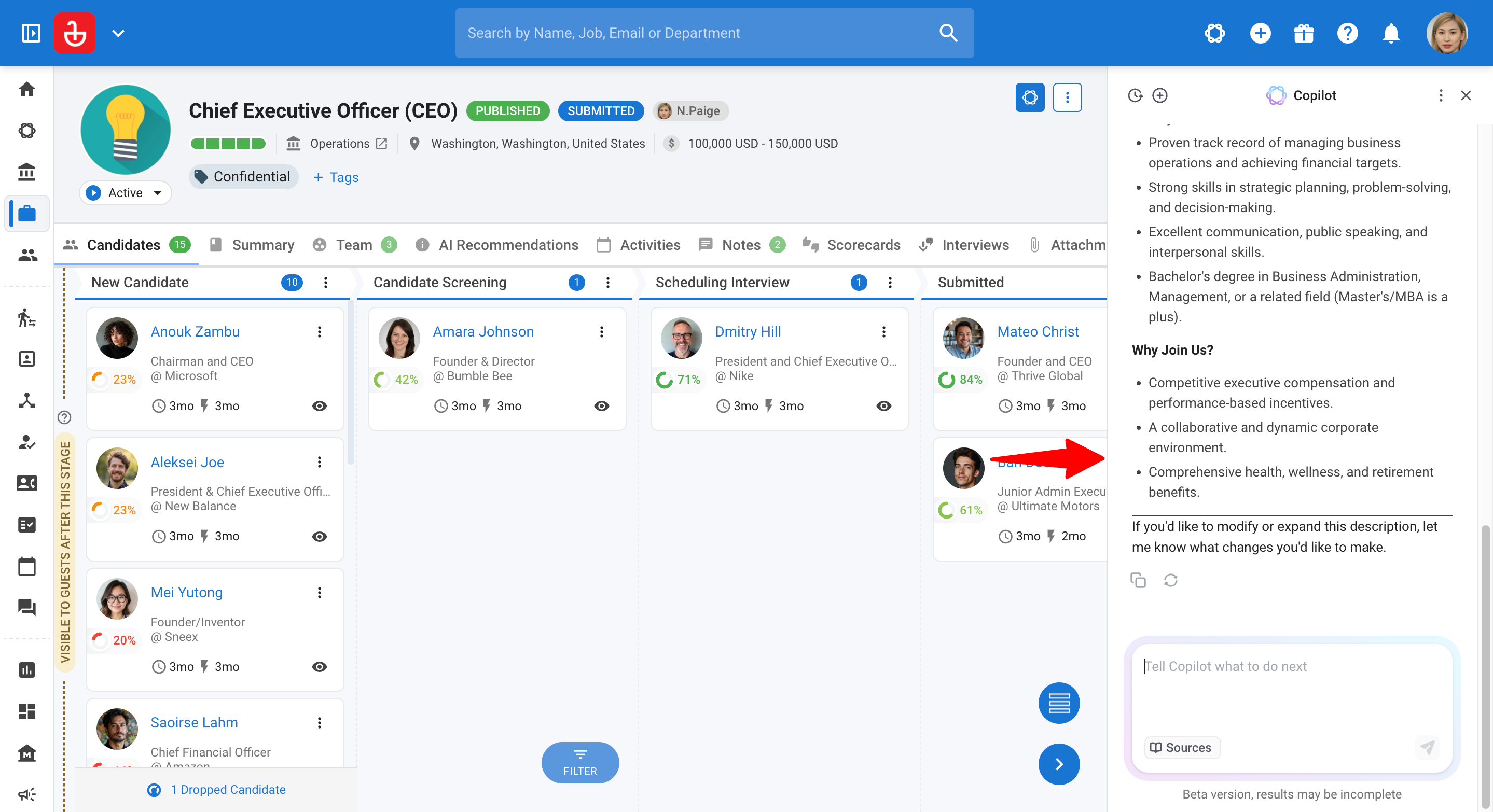
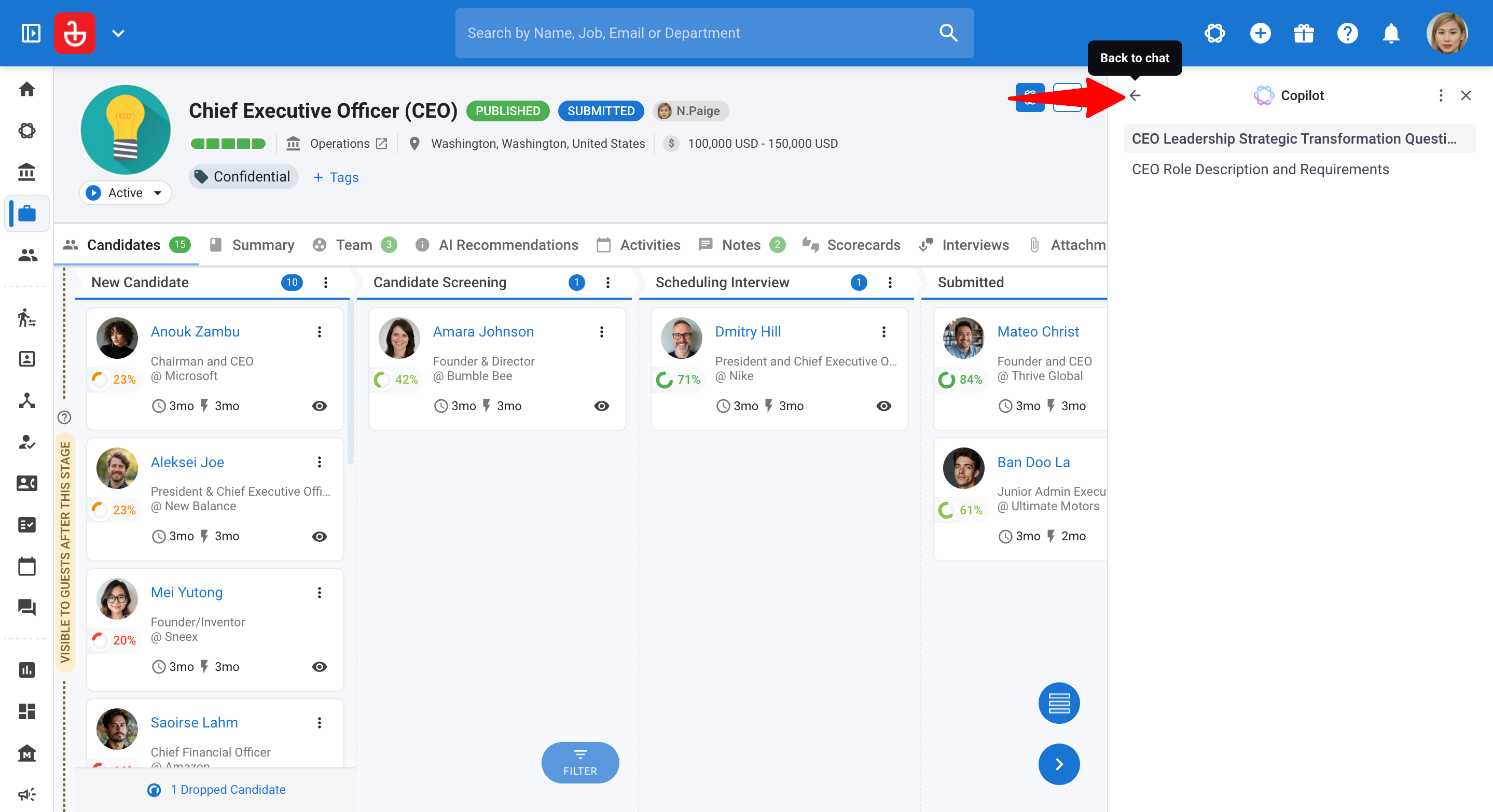
- In the side panel, click the back arrow (top left) to return to the chat you had open before.
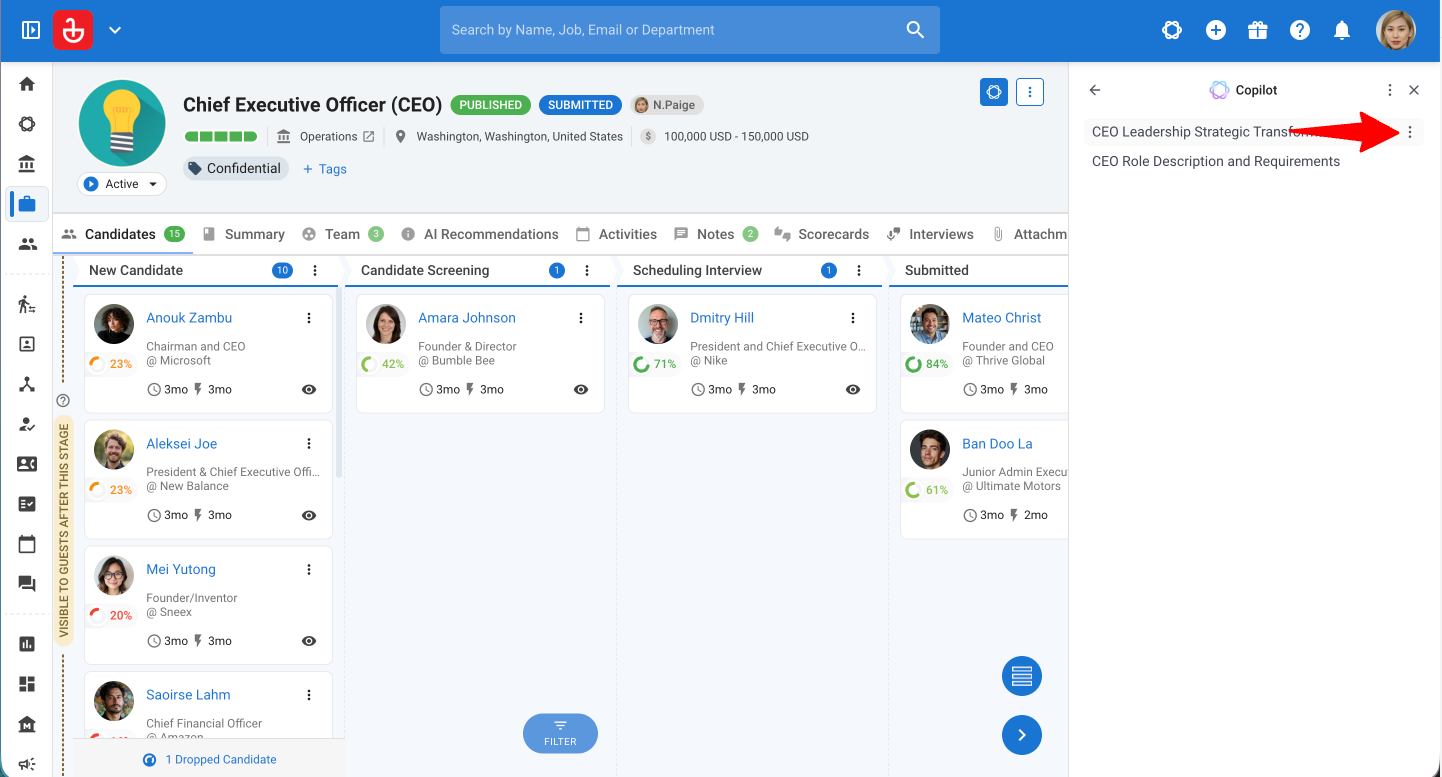
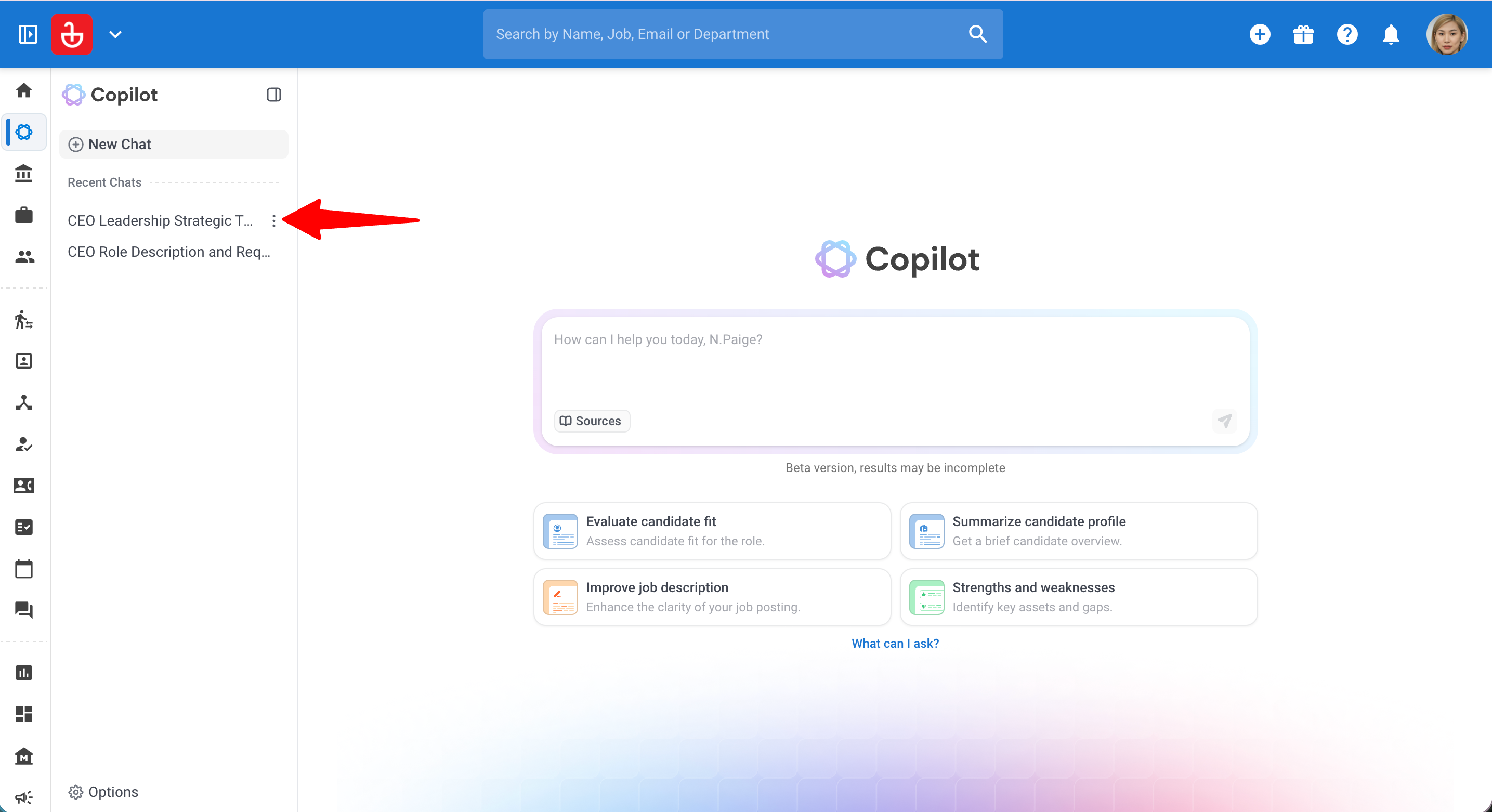
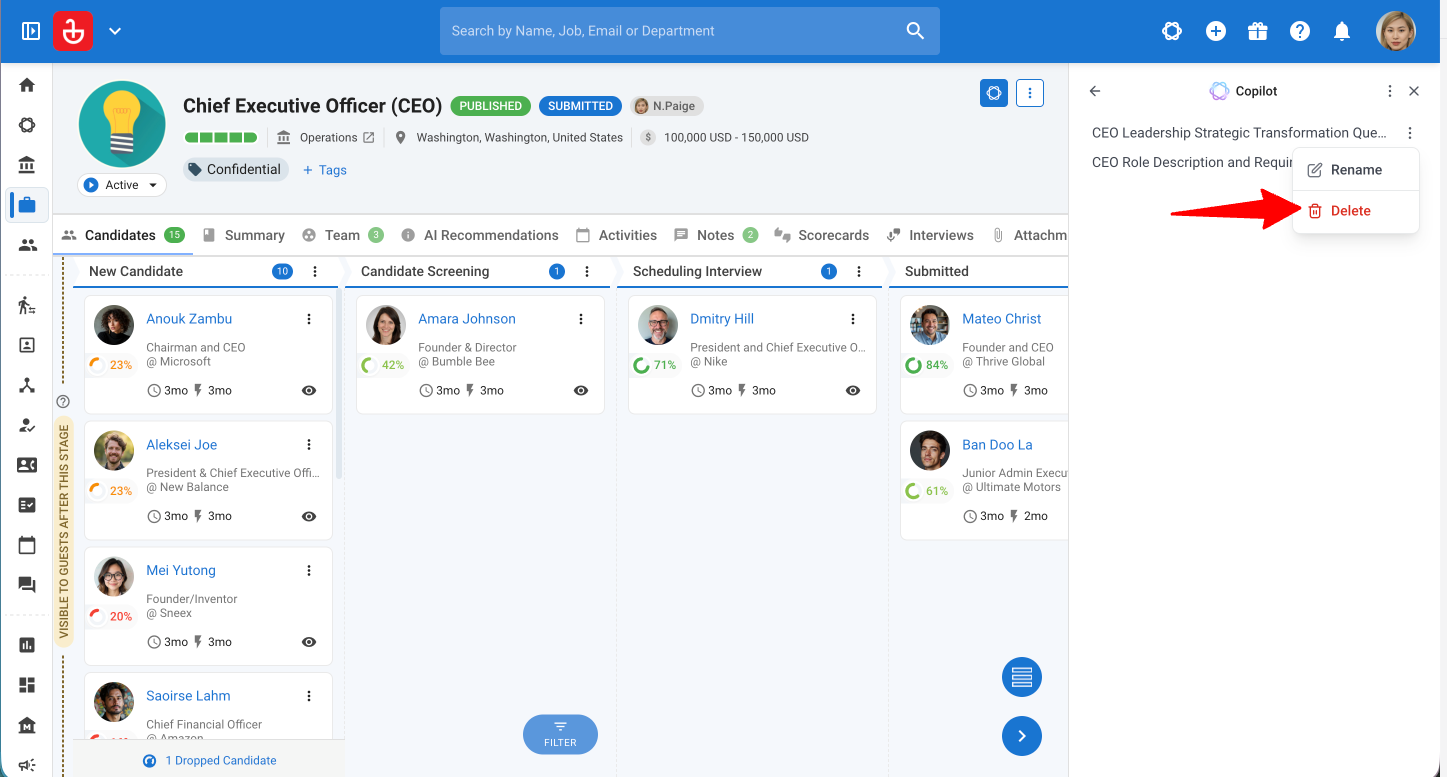
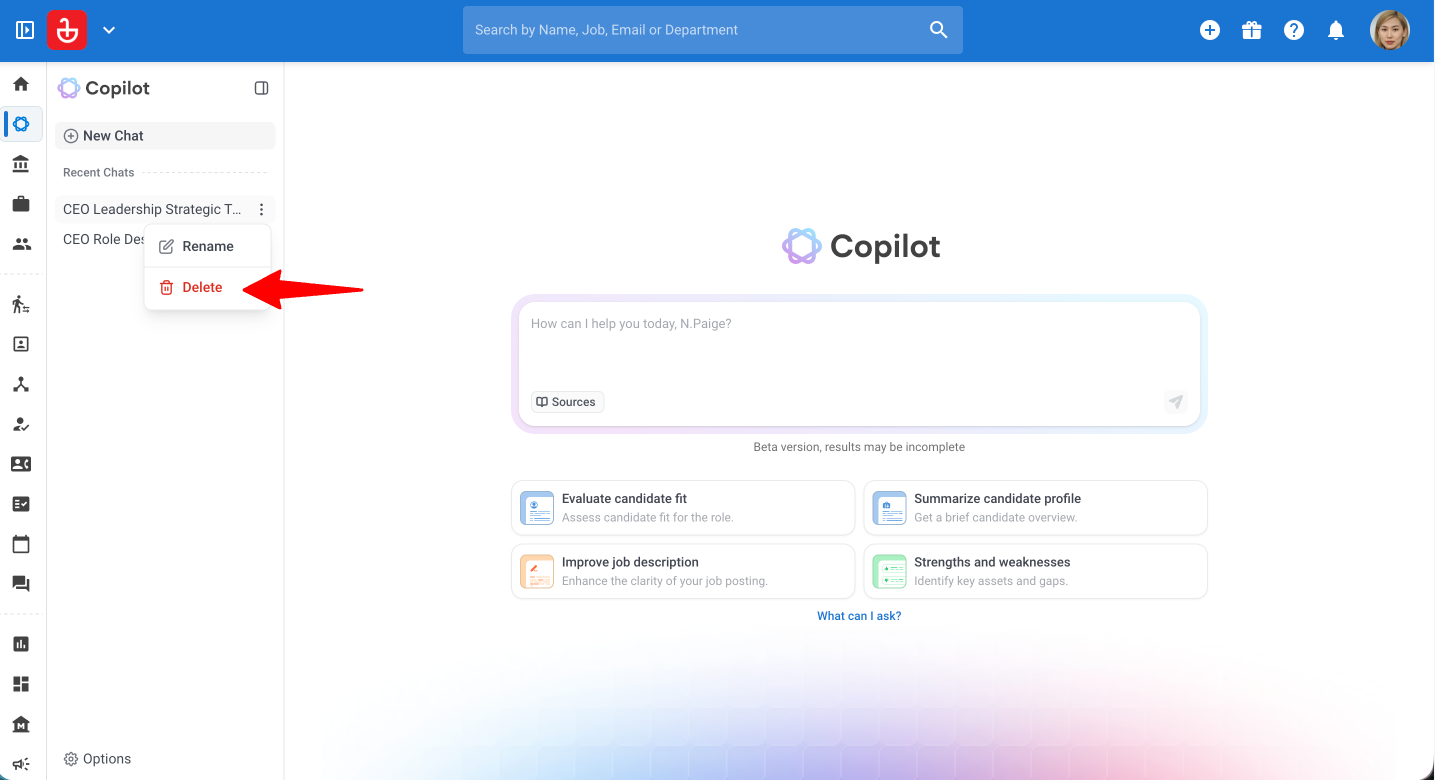
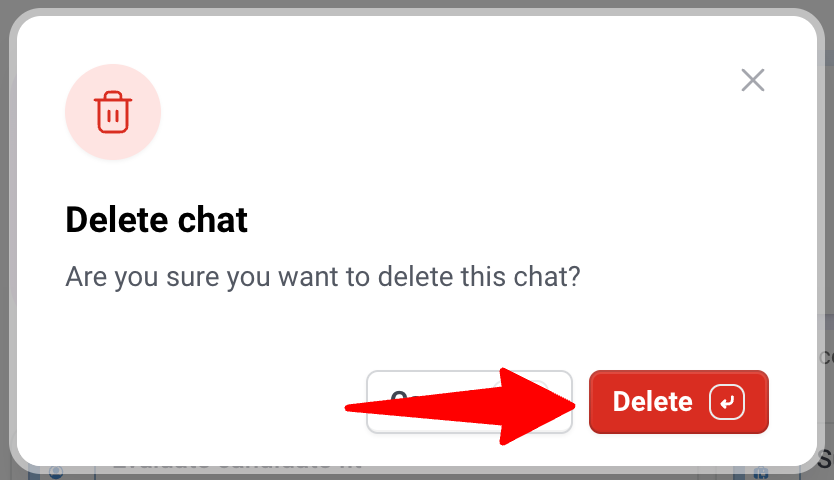
To delete a chat:
Deleted chats are permanently removed and cannot be recovered.
- Hover over the chat in your history and click on the 3-dots next to it.
- Click on the "Delete" button.
- Click "Delete" to confirm.
Step 5: Review your AI usage
AI Copilot usage is subject to plan-based limits to ensure fair usage and consistent performance.
To view usage and limits:
- Open AI Copilot either in the side panel or the full page.

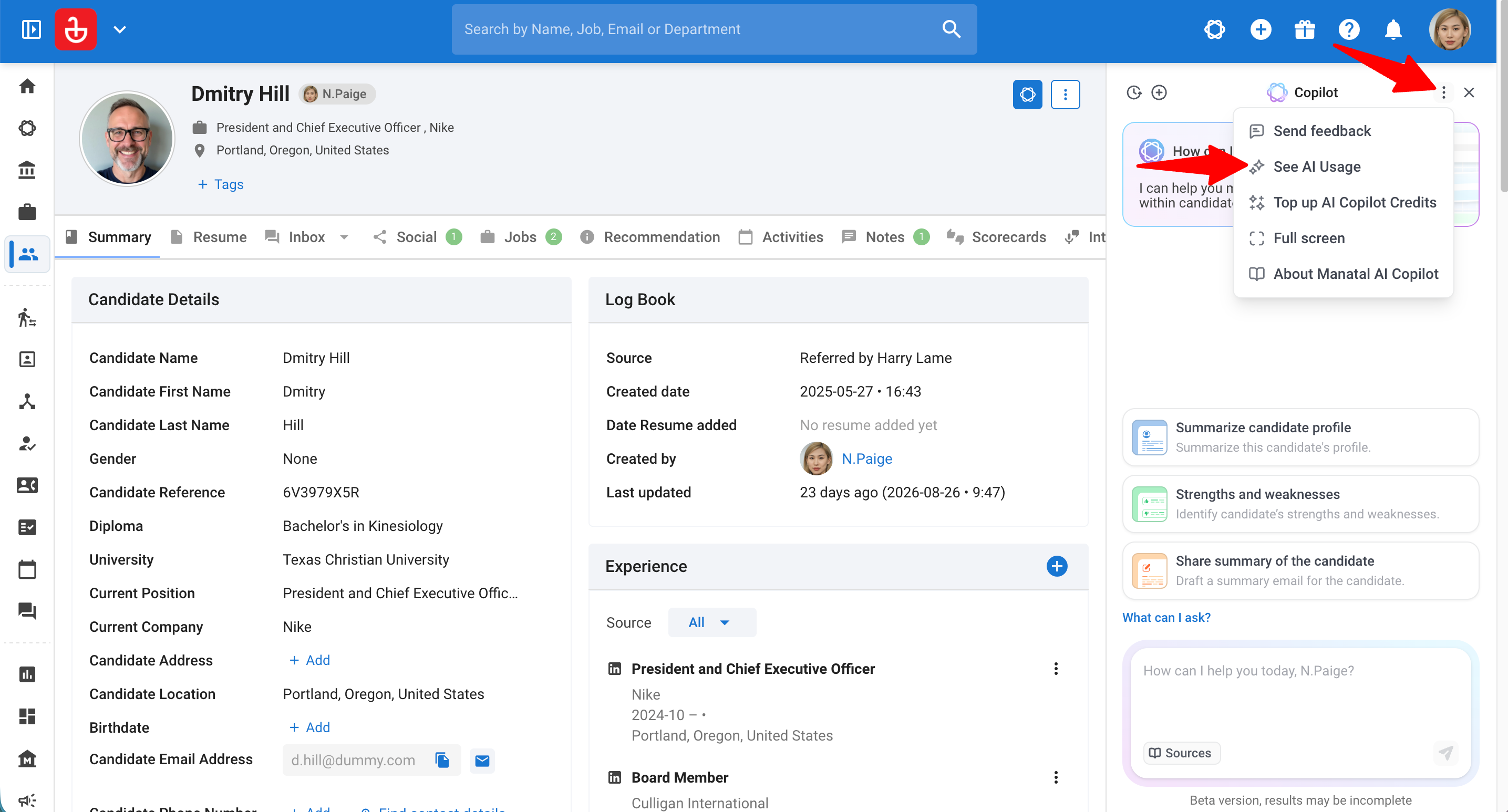
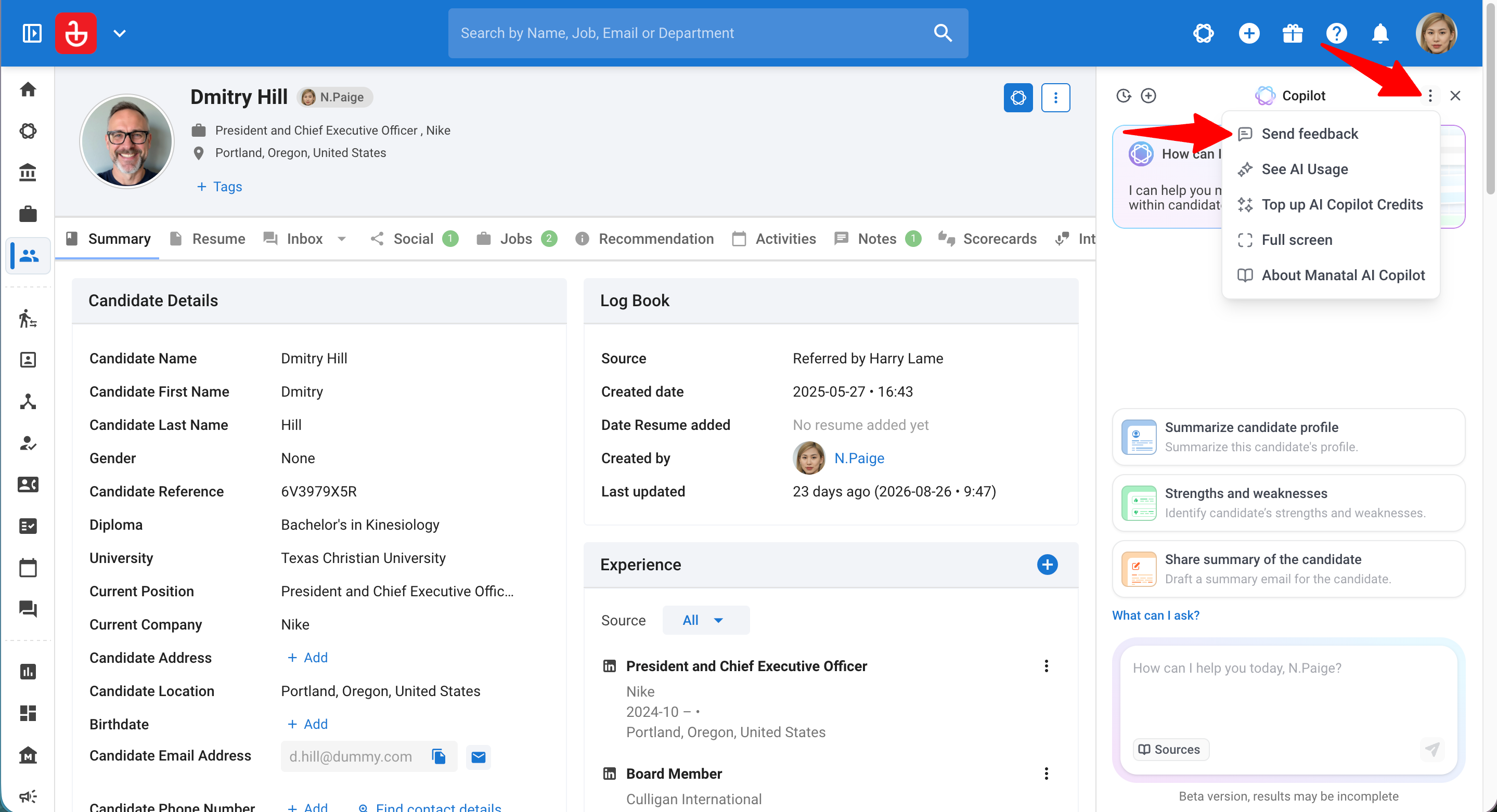
- In the side panel: Click the three-dot menu (⋯) and select "See AI Usage".
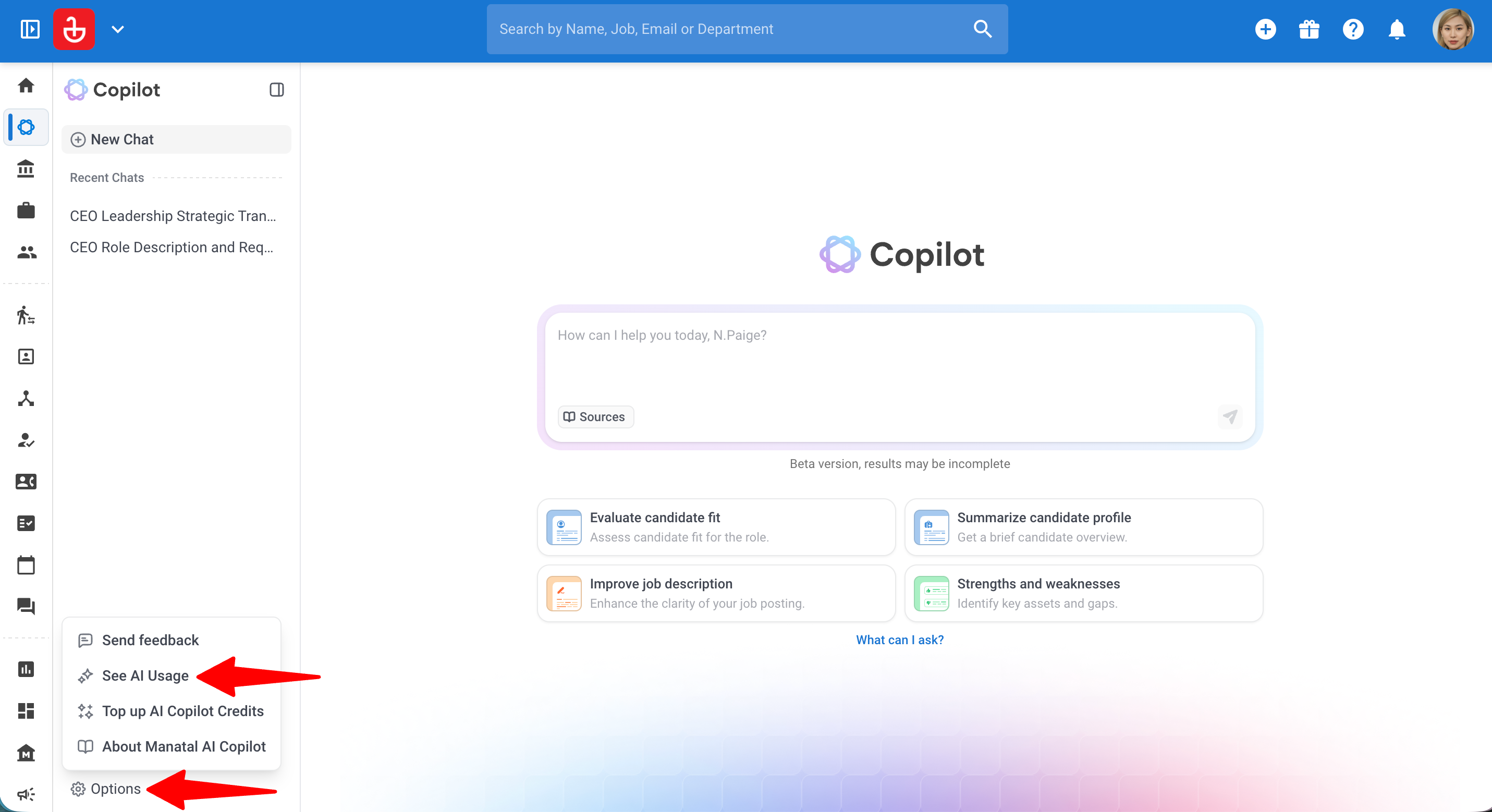
In full page: Click "Options" at the bottom of the Copilot side menu and select "See AI Usage".
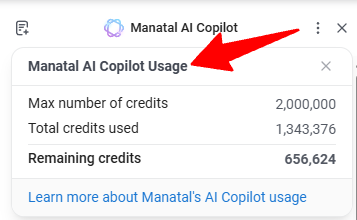
The panel will display:
- Your current consumption
- Any applicable limits based on your subscription plan & add-ons
Step 6: Top Up AI Copilot Credits
You can also top up credits directly from the dedicated Add-ons marketplace within our app. Learn more in this guide.
To top up AI Copilot Credits:
- Open AI Copilot either in the side panel or the full page.
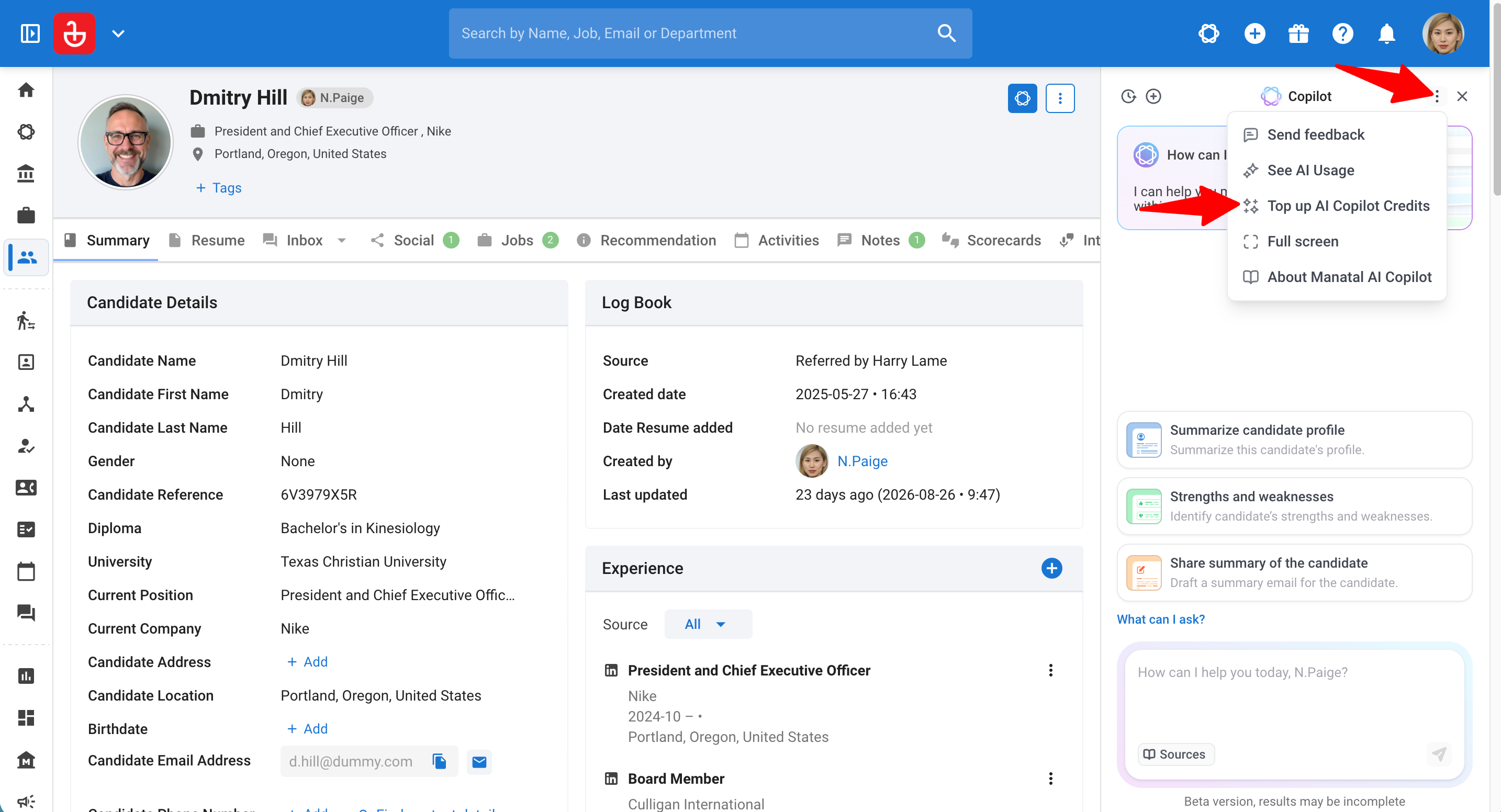
- In the side panel: Click the three-dot menu (⋯) and select "Top up AI Copilot Credits".
In full page: Click "Options" at the bottom of the Copilot side menu and select "Top up AI Copilot Credits".
- Click on "Contact Us".
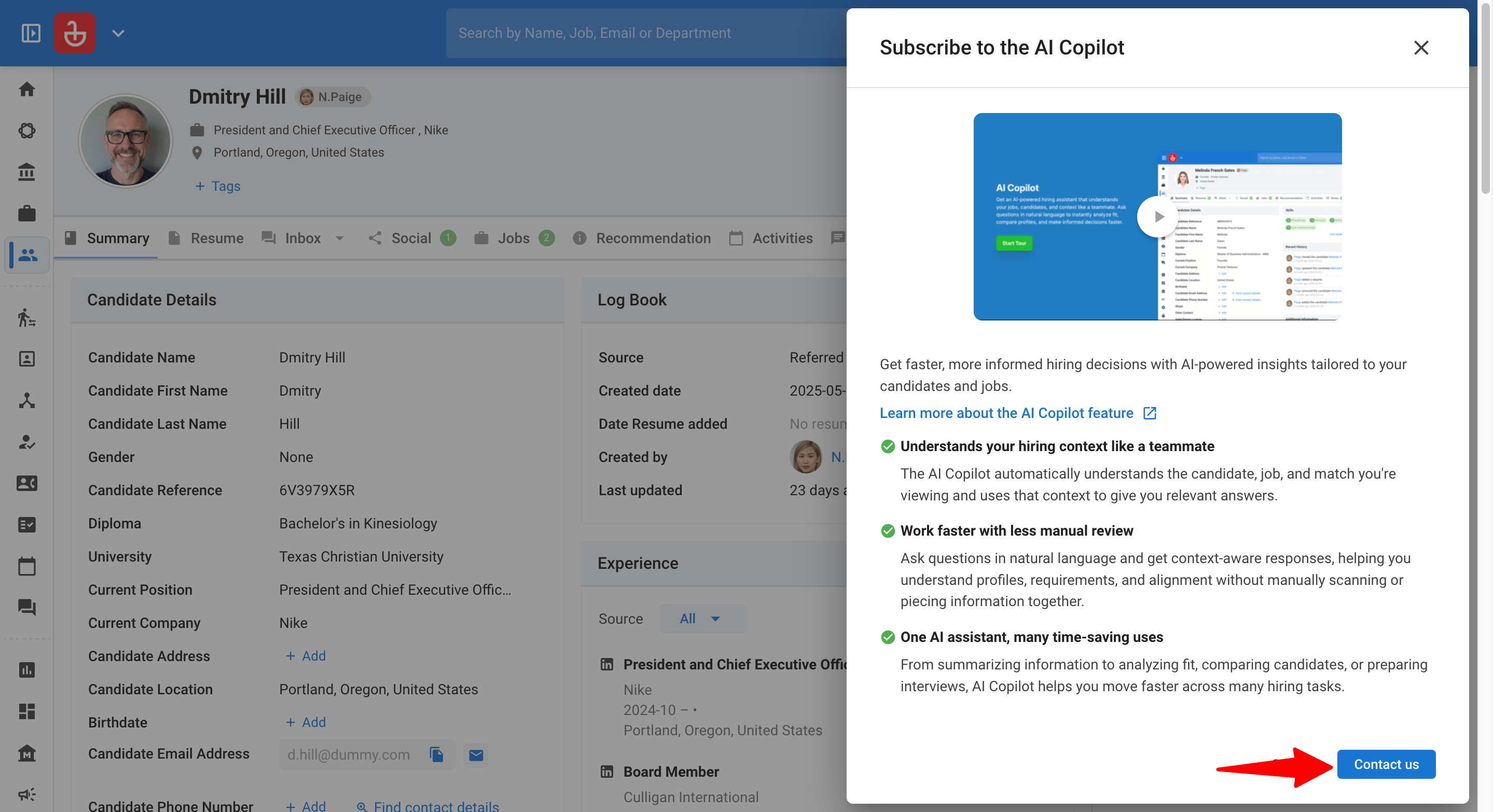
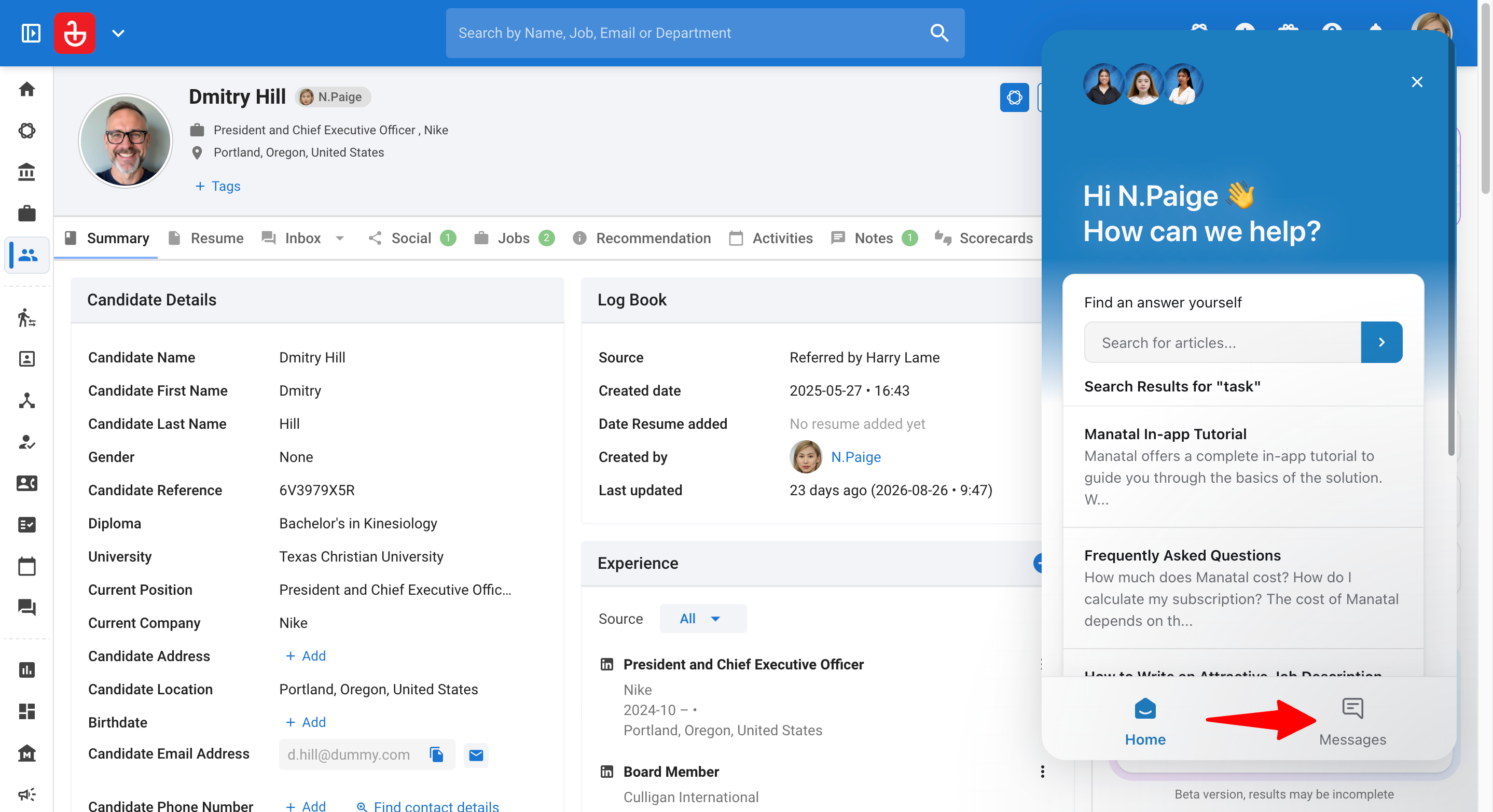
- Request your desired credit amount directly with our Support Team.
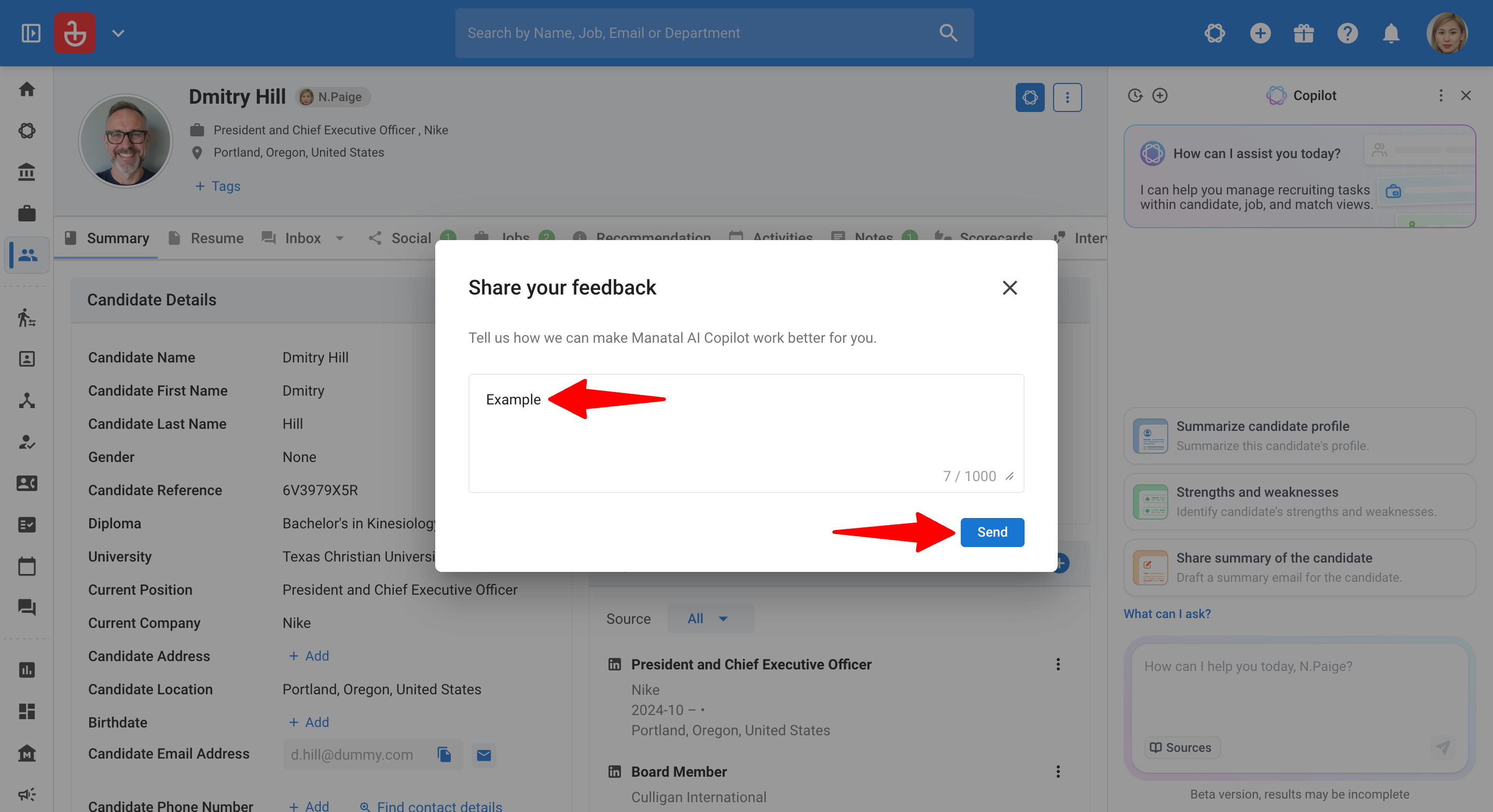
Step 7: Send feedback
- Open AI Copilot either in the side panel or the full page.
- In the side panel: Click the three-dot menu (⋯) and select "Send feedback".
In full page: Click "Options" at the bottom of the Copilot side menu and select "Send feedback".
- Fill in your feedback and click "Send".
Step 8: View Full screen
Relevant only if you have AI Copilot open in a side panel.
- Open AI Copilot either in the side panel.
- Click the three-dot menu (⋯) and select "Full screen".
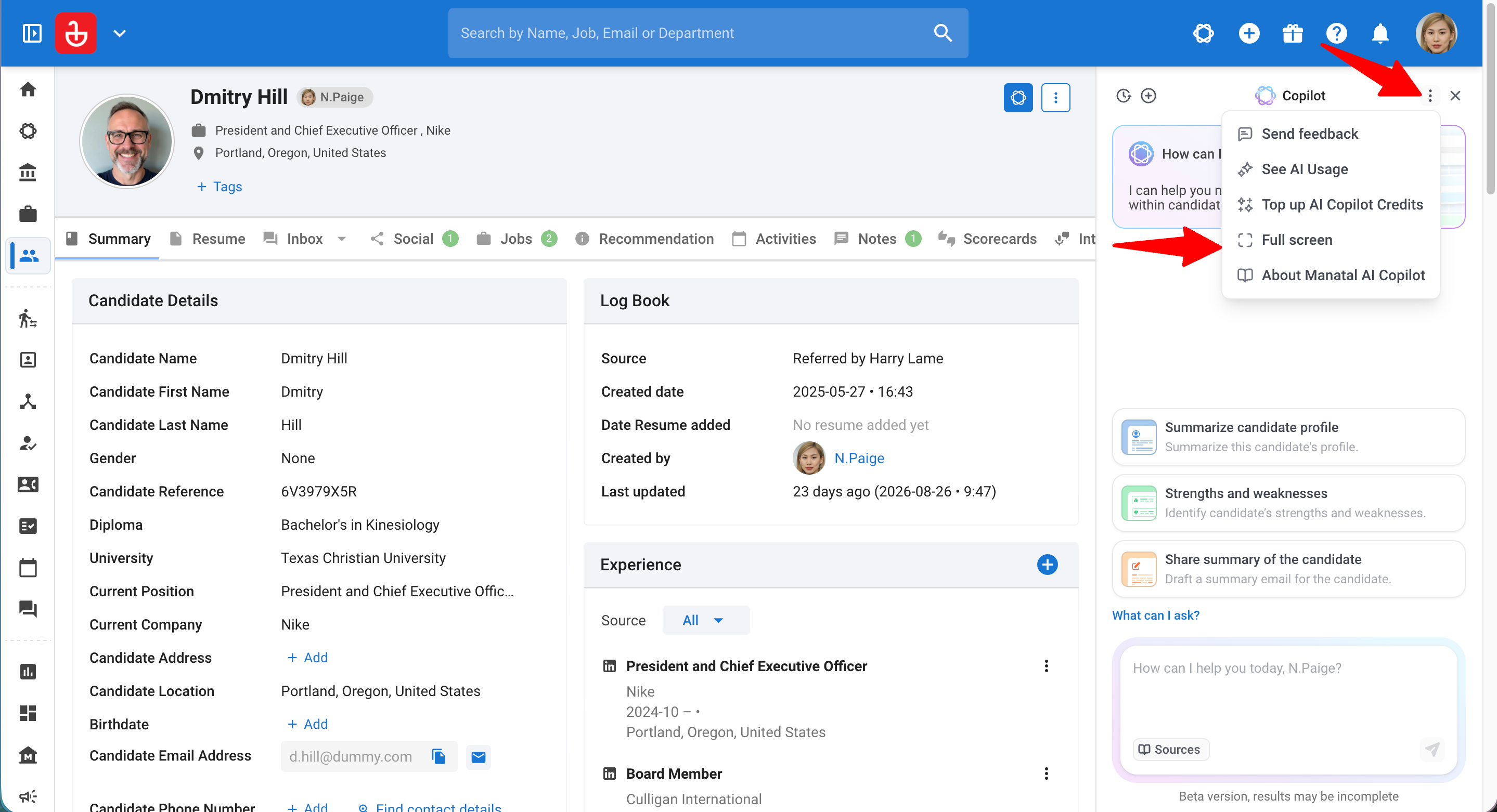
- Opens the Full page view.
What you can do with AI Copilot
- The following is just a sneak peek of what is possible with our AI Copilot, more use-cases will be added as we improve the feature over time.
- Refer to this guide that covers all data and interaction capabilities available within Manatal’s AI Copilot.
1. Summarize information
AI Copilot can condense large amounts of information into easy-to-read summaries, such as:
- Candidate background and experience
- Key job requirements
- Match and pipeline status
- Relevant notes and email interactions (when available)
This reduces time spent scanning profiles and documents.
2. Analyze fit and gaps
AI Copilot can help you understand how well a candidate aligns with a role by:
- Highlighting relevant experience and skills
- Identifying missing or weaker areas
- Suggesting topics to explore during interviews
This is especially useful when managing high-volume pipelines.
3. Prepare interview questions
AI Copilot can generate interview questions tailored to:
- The candidate’s background
- The job’s requirements
- Identified gaps or risks
You can use this to:
- Prepare for interviews faster
- Standardize interviews
- Focus discussions on what matters most
4. Draft or refine job descriptions
AI Copilot can help you:
- Draft a job description from scratch
- Rewrite or shorten an existing description
- Adjust tone, seniority level, or clarity
This ensures consistency while reducing manual effort.
5. Compare candidates
AI Copilot can compare multiple candidates for the same role by:
- Highlighting differences in experience
- Comparing strengths and weaknesses
- Supporting shortlist discussions
This is particularly helpful for internal reviews or client presentations.
Quick Prompts
Start with these prompts to hit the ground running.
Candidate-focused prompts
- “Summarize this candidate’s experience in 5 bullet points.”
- “What are this candidate’s strongest qualifications for this role?”
- “What concerns or risks should I explore when interviewing this candidate?”
Job-focused prompts
- “Summarize the key requirements of this job.”
- “Rewrite this job description to be clearer and more concise.”
- “What skills are critical for success in this role?”
Match-focused prompts
- “Is this candidate a good fit for this job? Explain why.”
- “What gaps exist between this candidate and the role?”
- “How long has this candidate been in the pipeline and at which stage?”
Notes & Emails-focused prompts
- “Summarize the notes for the candidate Daniel Wellington and list action items.”
- “Summarize this email thread and suggest a concise reply.”
Common Use Cases
Explore our advanced prompt templates for specific, high-impact use cases.
Use Case 1: Check a Candidate's Fit for a Job
Scenario: You have a candidate open on a job and need a fast, structured read on whether they're worth pursuing before you invest time.
How to Use (Prompt Template):
The everyday version, our single most-used prompt:
Evaluate this candidate's compatibility with the job.
The fuller version when you want a clean verdict to triage or share:
Give a match verdict for this candidate against the job.
Use only retrievable data: work experience, skills, seniority, the job description,
and any candidate notes.

OUTPUT FORMAT:
Verdict: [Strong match | Partial fit | Poor fit]
Why: [2-3 sentences citing the specific experience or skills that drive the verdict]
Top gap: [the single most important missing requirement, or "None material"]

RULES:
- Evidence-led only. No invented detail. If a required field is empty, say "Not stated".
- One verdict line, no hedging. Lead with the decision.

OUTPUT: Return only the three labelled lines.
What You'll Get:
- A clear Strong / Partial / Poor verdict in seconds.
- The specific experience and skills that justify it.
- The single most important gap to weigh before you commit.
Use Case 2: Screening-Call Prep
Scenario: You're about to phone a candidate and want a one-screen brief so the call is sharp.
How to Use (Prompt Template):
Prepare a screening-call brief for this candidate against the job.
Use only retrievable data: profile, work experience, skills, notes, and the job requirements.

OUTPUT FORMAT (three labels only):
Confirm: [2-3 things the profile suggests but should be verified on the call]
Probe: [2-3 gaps or ambiguities vs the job requirements to dig into]
Sell: [1-2 aspects of the role likely to appeal, based on the candidate's trajectory]

RULES:
- Evidence-led only. Base "probe" points on what is missing from the experience and skills.
- Client-presentable phrasing. No internal jargon.
OUTPUT: Return only the three labelled sections.
What You'll Get:
- What to confirm, so you don't waste the call re-reading the CV.
- Where the gaps are, so you probe the right things.
- What to sell, so you can pitch the role while you have them.
Use Case 3: Client-Ready Candidate Summary
Scenario: You've decided to submit a candidate and need a polished, impact-led write-up you can send to the client without editing.
How to Use (Prompt Template):
Write a client-facing candidate summary for this candidate against the job.
Use only retrievable data: work experience (titles, employers, dates, role
descriptions), the profile description/notes, skills, and the current salary,
expected salary, notice period, and job description fields.

STRUCTURE (bullet points, no headings):
- Open with the candidate's current role, employer, and scope of responsibility.
- Follow with ~3-6 bullets on the most commercially relevant achievements,
strengths, or differentiators.
- Lead with impact and outcomes, not day-to-day duties.
- Tailor the emphasis to the profile type (e.g. an Executive Assistant, a finance
professional, and a commercial leader each lead with different strengths).
- Where present, add compensation and notice as separate bullets at the very end,
labelled: "Last Drawn Salary:", "Expected Salary:", "Notice Period:".

RULES:
- Evidence-led only. Use only what is in the candidate's experience and
description/notes. Do not invent, infer, or embellish.
- Omit any compensation or notice bullet whose field is empty. Do not write
"not available" or leave a placeholder.
- If the profile is thin, produce fewer bullets rather than padding.
- Concise and client-ready: each bullet scannable by a hiring manager at a glance.

OUTPUT INSTRUCTIONS:
- Return ONLY the finished bullet list. No preamble, no reasoning, no closing
commentary. No text before the first bullet or after the last.
What You'll Get:
- A client-ready summary that leads with achievements, not job duties.
- Emphasis tailored to the type of role.
- Salary and notice appended only when the data exists.
Use Case 4: Anonymized "Blind" Profile
Scenario: You want to share a candidate with a client before revealing their identity.
How to Use (Prompt Template):
Produce an anonymized blind profile of this candidate against the job.
Use only retrievable data: work experience, skills, seniority, location (region only),
and availability.

RULES:
- Remove all identifying details: name, current employer name, contact info, and any
  unique identifier. Refer to companies by type/size/sector (e.g. "a global logistics firm").
- Evidence-led only. No invented detail. Empty field = omit the line.
- Lead with the strongest relevant experience for this job.

OUTPUT FORMAT:
Profile: [seniority + function]
Based in: [region]
Relevant experience: [3-5 impact-led bullets, employers described by type not name]
Availability: [notice period if stated, else omit]
OUTPUT: Return only the finished blind profile.
What You'll Get:
- A shareable profile with name and employers masked.
- Companies described by type and sector, keeping the substance intact.
- A clean lead with the most relevant experience.
Use Case 5: Client-Presentation Summary (5-Point)
Scenario: A client wants candidates scored against a consistent set of criteria, as a short email.
How to Use (Prompt Template):
Summarise this candidate against the job for client presentation.
Use only retrievable data: profile, work experience, skills, salary/notice/availability,
notes on this candidate (incl. saved interview notes), and the job's requirements.

Assess these 5 points:
1. Technical Expertise
2. Competencies & Experience
3. Stakeholder Engagement
4. Remuneration & Availability
5. Fit & Value-Add

FORMAT SPEC:
- 5 bullet points (strengths, problems solved,
  availability, rate), no name or identifying details, as a short client email.

RULES:
- Produce output in the FORMAT set above. Do not substitute another format.
- Evidence-led only. No invented or inferred detail. Empty field = "Not stated."
- Lead with substance, not a restatement of the heading.

OUTPUT INSTRUCTIONS:
- Return ONLY the finished output in the chosen format.
- Do not show reasoning, planning, or commentary. No text before the first line
  or after the last line of the output.
What You'll Get:
- A consistent 5-point scorecard the client can compare across candidates.
- An anonymized short-email format ready to forward.
- Honest "Not stated" where data is missing, no guesses.
Use Case 6: Interview Preparation from Profile & Job Description
Scenario: You have an upcoming interview and need tailored questions and talking points based on the candidate's background and the job requirements.
How to Use (Prompt Template):
Generate 5 competency-based interview questions for this candidate for the job.

RETRIEVE AND USE ONLY:
- The candidate's profile summary, work experience, skills, and industries.
- The job's title, description, required seniority, and required skills.

For each question:
- Tie it to a specific competency or requirement in the job description.
- Target evidence the candidate can perform this role.
- Prioritise areas where the candidate's profile is thin, unproven, or needs validation against the job.
Cover a mix across: technical/functional, behavioural/competency, stakeholder engagement, and role-specific scenarios from the job description.

RULES:
- Output questions only. Do not fabricate background or assume facts not in the retrieved profile.
- Base "gap" questions on what is missing from the work experience and skills fields, not assumptions.
- Phrase each as a hiring manager would ask it live. Client-presentable, no internal jargon.

OUTPUT: numbered list. After each question, an italic note stating which competency or job requirement it assesses.
What You'll Get:
- Tailored questions that align the candidate's experience with the role.
- Key areas to probe during the conversation.
- A note under each question showing what it's testing.
Use Case 7: Interview Debrief
Scenario: You've finished an interview and want your rough notes turned into a clean, shareable record with a recommendation.
How to Use (Prompt Template):
Turn the interview notes on this candidate into a structured debrief against the job.
Use only the saved notes on this candidate and the job requirements. Do not add
detail not present in the notes.

OUTPUT FORMAT:
Overall impression: [one line]
Strengths observed: [bullets, each tied to a note]
Concerns / follow-ups: [bullets, each tied to a note]
Recommendation: [Advance | Hold | Decline] - [one-line reason]

RULES:
- Evidence-led only. If the notes are silent on something, do not infer it.
- Neutral, factual tone suitable for sharing with a hiring manager.

OUTPUT: Return only the finished debrief.
What You'll Get:
- Messy notes turned into a tidy, shareable debrief.
- Strengths and concerns each anchored to a real note.
- A clear Advance / Hold / Decline recommendation.
Use Case 8: Executive Summary Email for a Shortlist
Scenario: Your client or hiring manager needs a quick overview of several named candidates before deciding who to interview.
How to Use (Example Prompt):
For the candidates selected below, prepare an executive summary for our client by doing the following:

1. Retrieve the full profiles of the following candidates:
   - [CANDIDATE NAME]
   - [CANDIDATE NAME]
   - [CANDIDATE NAME]
2. Then create a professional executive summary email with the following template:

Hi [RECIPIENT NAME],

Please find below the top candidates for your review. Thank you.

Expert: (Candidate Display Name) (Candidate Location)
Why We Like This Expert: (Summary of Candidate 2-3 Lines)
Availability: (Manual Input)
Relevant Experience:
- (Position 1) @ (Company Name) - (Date Range) - (Tenure)
- (Position 2) @ (Company Name) - (Date Range) - (Tenure)
What You'll Get:
- A professional, concise email ready to send.
- Each candidate's key highlights summarized.
- Relevant experience laid out in a consistent format.
Data Privacy & Security
Manatal AI Copilot follows the same strict data principles as Manatal’s other AI features:
- Only uses data within your Manatal account
- Does not use customer data to train AI models
- Honors existing user permissions
- Processes data only to respond to your requests
If you do not have permission to see certain data in Manatal, AI Copilot cannot see it either.
Transparency & Trust
AI Copilot is designed to be transparent and explainable:
- Responses are based on visible Manatal data
- Copilot will indicate when information is missing or unclear
- You can always validate insights against the original source data
This ensures AI Copilot remains a trusted assistant.
Best practices
- Use AI Copilot to save time, not replace review
- Ask clear and specific questions
- Use follow-up prompts to refine results
- Validate critical decisions using original data
FAQ
-
What data and context is accessible?
AI Copilot can retrieve data from Candidates, Jobs, Matches, Organizations, Notes, and Candidate Emails. For more details, please find the exact fields & interactions here.
When retrieving candidate-related information, Copilot may automatically include relevant notes and email conversations as part of the context to improve response quality. -
Does AI Copilot include custom fields?
No. Custom fields are not currently accessible via the AI Copilot. We are exploring custom field support in future iterations and will actively collect feedback. -
What makes AI Copilot different?
AI Copilot doesn’t only read the page you’re currently on. You can ask about any candidate, job, organization, match, note, or candidate email thread even if you’re not viewing it by referencing it in your prompt. This helps you retrieve and use information without extra navigation.
Example prompts- “Show me the Senior Product Manager role at Mana.”
- “Summarize the notes for Daniel Wellington.”
- “What emails have we exchanged with [candidate name]?”
- “Is [candidate name] a good fit for [job title] at [company]?”
If Copilot needs clarification (e.g., similar names), it will ask follow-up questions.
-
What other functionality is available besides chat?
To guide users and support continuous improvement, our AI Copilot includes:- Chat History - View, reopen, and delete your past Copilot conversations.
- Full Page View - Open Copilot in a dedicated page for longer or more detailed work.
- Suggestions - You will be able to see suggested actions & prompts based on the context you are viewing to help you get started.
- Share Feedback - Feel like something is not working well or would like to give suggestions? We have also added the ability to give feedback directly for the AI Copilot and those will be routed to our internal teams for review.
-
Do you need to be technical to use the AI Copilot?
No. You can use Copilot just like popular AI Tools like ChatGPT, by simply typing your question or prompt naturally. -
Is my data used to train AI models?
No. The AI Copilot is not trained on client data. It uses a general AI model that is customized for recruitment needs to interact with you and their data. We do not send client data to the AI providers we use. -
Can the AI Copilot make hiring decisions?
No. AI Copilot provides insights and assistance only. All hiring decisions remain human-led. -
Why can’t the AI Copilot answer some questions?
This can happen when:- The required data is missing or incomplete
- The question relies on assumptions
- The requested data is not yet supported in the current context coverage
If something isn’t supported yet, please share feedback. We’re continuously looking to improve the AI Copilot’s capabilities.
-
How are AI Copilot credits used?
AI Copilot credits are not fixed per action. Usage depends on the request and the amount of data processed.
In general:- More data processed = more credits used
- More complex prompts = more credits used
For example:
- Summarizing multiple candidate profiles will use more credits than summarizing a single profile
- Generating interview questions from a short job description will use fewer credits than evaluating a candidate against a detailed job description
To provide a rough benchmark from common in-app prompts:
Prompt Approximate Credit Usage Explanation “Identify this candidate’s strengths & weaknesses” ~20,000 credits Reads the candidate profile (including notes & emails if present) and generates a summary “Evaluate this candidate’s compatibility with the job” ~30,000 credits Reads both the candidate profile (including notes & emails if present) and the job description “Generate 5 interview questions using this job’s description” ~15,000 credits Reads the job description to generate tailored interview questions. There is no fixed credit cost per action. Actual usage may vary depending on:
- Length of the job description
- Length of candidate profiles
- Number of records being analyzed
- Complexity of the prompt or request
- Additional related context included (such as notes or email conversations)
ImportantThe examples above are estimates only and are intended to provide general guidance. Actual credit usage may change over time as Manatal continues to improve AI Copilot, optimize prompts, and upgrade underlying AI models and capabilities.
-
Can other users see my Copilot chat history?
No. Chat history is private. Each user can only see their own conversations, even within the same account. -
Can I recover a deleted chat?
No. Deleting a chat permanently removes it and it cannot be restored.
This feature uses AI to support your recruitment workflow. AI outputs are meant to guide, not replace, your judgment. Outputs may not always be fully accurate or complete, we recommend reviewing them as part of your process. All final recruitment decisions remain your sole responsibility.